

BTS installation guide · Jeep lighting
Morimoto Type M Fog Light Connector and Film Guide
Identify the supplied connector, check polarity before locking terminals and apply optional Lamin-X film.
This guide covers the connector and optional-film procedures in Morimoto’s original XB fog-light instructions. It does not specify Jeep bumper removal or a universal mounting procedure. For a Wrangler JK, confirm the actual bumper mounting pattern and connector against the Type M product before installation; JK and JL bumpers are not interchangeable fitment evidence.
Check the actual factory bumper and fog-light connector, especially on a 2018 JK. Morimoto lists a 5202 adapter for 2010+ Jeep applications as an additional accessory; do not assume it is included in every BTS set.
Identify and connect
1. Match the supplied connector
The original diagram shows H11/H9/H8, 9005/9006/H10 and 5202/PSX24W male connector families. Identify the actual vehicle connector before assembling any loose terminals.
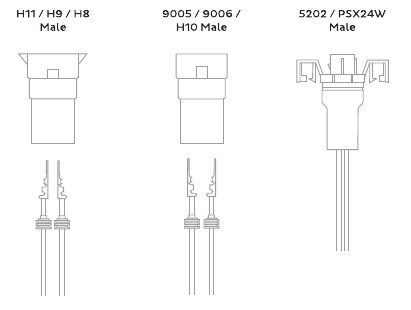
2. Confirm terminal orientation before locking
For the H11/H9/H8 and 9005/9006/H10 types, the manual leaves terminals outside the plastic housing because vehicle polarity can differ. With the circuit off, position the terminals at the matching factory connector without allowing them to touch each other. Check lamp operation to establish the correct orientation, switch the circuit off again, then lock the terminals into the supplied housing in that same orientation. If the connector or polarity cannot be identified confidently, have the connection completed by a qualified installer.
3. Complete the vehicle-specific fitting
Use the correct bracket and adapter for the actual bumper, secure the wiring and check both lamps. The two-page source does not provide JK bumper-fastener locations or an aiming measurement, so those details must come from the matching vehicle and lamp instructions.
Optional Lamin-X film
The film is an optional accessory. A yellow film does not make the lamp a separate amber-LED version.
4. Wet the adhesive face
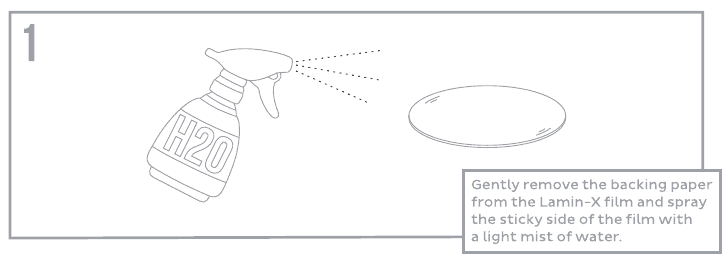
Gently peel the backing from the film and apply a light mist of water to its adhesive surface.
5. Centre and smooth the film
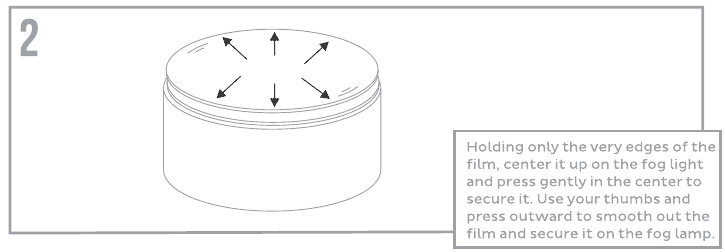
Hold the film only by its edges, centre it on the lens and press lightly in the middle. Smooth outward with your thumbs to seat it on the lens.
6. Set any lifting edges
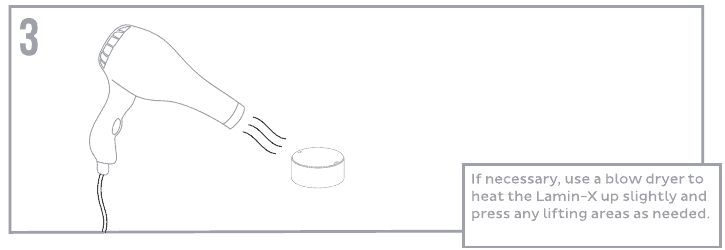
If needed, use gentle warmth from a blow dryer to help the film conform, then press down any lifting areas.
Watch the manufacturer video
Manufacturer video linked from the exact product or installation page. Follow the written equipment branch for your vehicle.
Instructions and matching products
Open the original Morimoto PDF (2 pages)
Original technical photographs and diagrams: Morimoto. BTS explanatory text prepared from the linked instructions and current product information, checked October 24, 2026. No revision number is printed on the retained manual unless shown in the original file.