

BTS illustrated installation guide
Toyota Tacoma 80 mm HD Halo Retrofit Planning and Wiring Guide
These internal rings require headlight opening, custom mounting, wiring and resealing. Diode's Tacoma-specific application is 2016–2019 and notes possible bezel modification. Professional installation is strongly recommended. This is not a complete-headlight replacement guide and does not establish fitment in 2020–2023 housings.
Before you start
Check the exact headlight housing, available space and 80 mm ring dimensions before opening it. Plan mounting and wire routing clear of the original light sources. Use an installer familiar with that housing's sealant and resealing requirements; the supplier does not provide a Tacoma-specific heating temperature or opening time in these sources.
1. Mount the ring clear of heat sources
Once the headlight has been opened appropriately, Diode describes beading wire or a suitable JB Weld mounting method. Position the ring away from the original light source to avoid heat damage. Check that the ring and mounting do not interfere with the headlight optics or adjustment.
2. Route and seal the lead
Route the ring's lead through the shroud or bezel toward the rear of the headlight. Protect it from sharp edges and moving components. Seal any new holes so the completed housing can retain its weather seal.
3. Keep the driver between the ring and the vehicle wiring
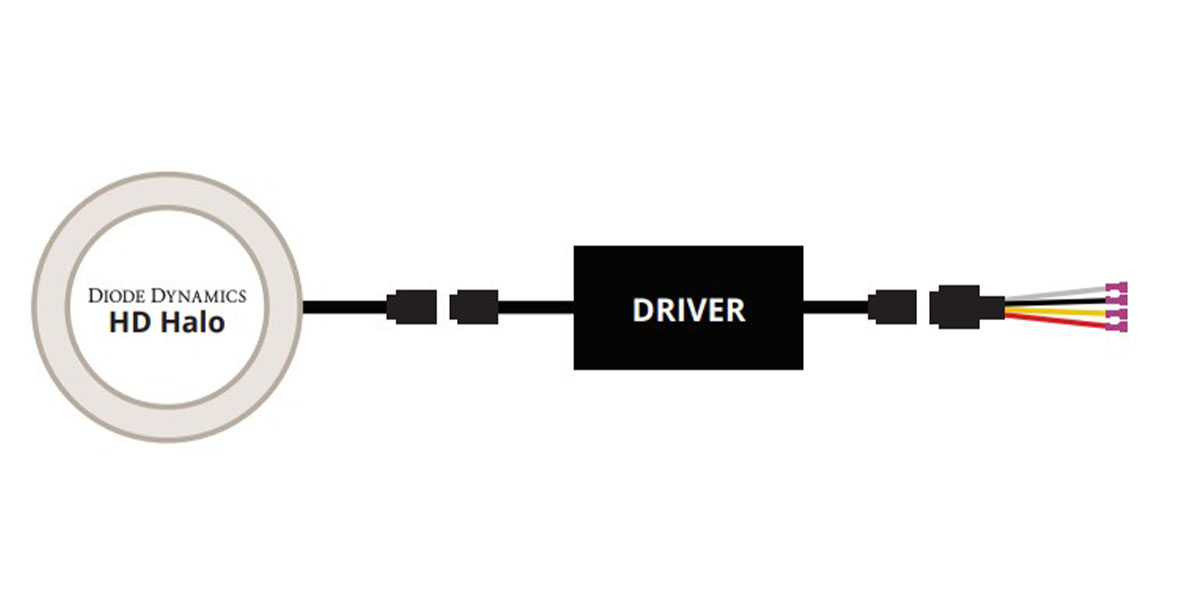
Connect the halo to its supplied driver, then connect the driver to the input pigtail. Never plug the ring directly into the vehicle-side pigtail. The original diagram below shows the required order.
4. Match the wire functions to the actual driver
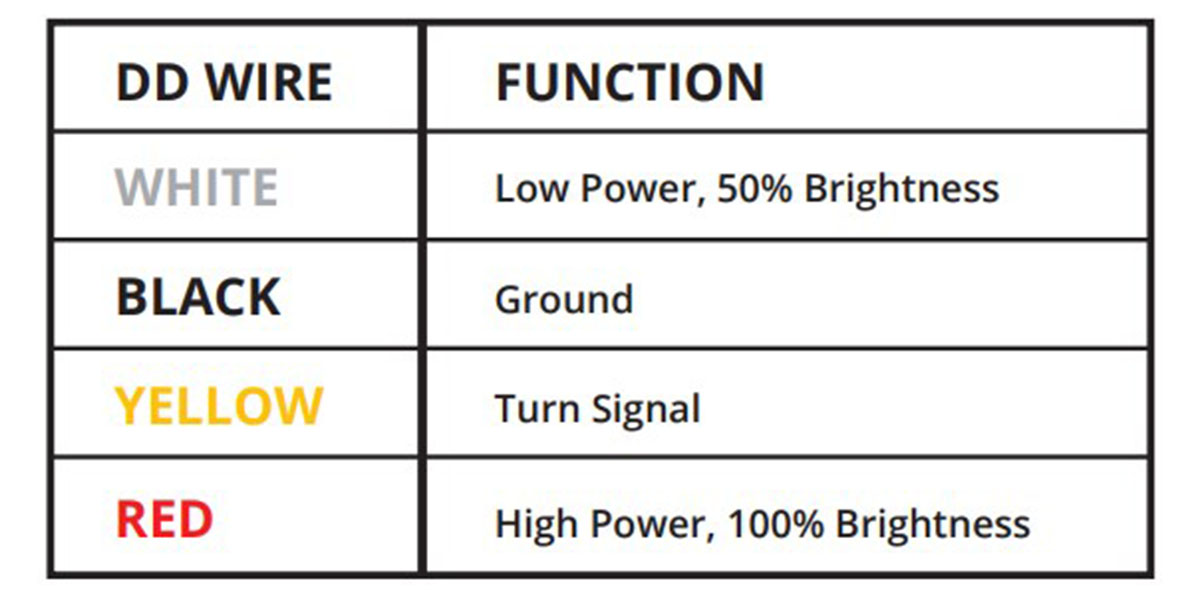
The original HD driver chart shows White for low power at 50%, Red for high power at 100%, Black for ground and Yellow for the turn-signal input. The exact DD2061 Switchback product description identifies White running-light and Amber signal operation. Red DD2049 and Amber DD2025 are single-colour rings; do not assume they produce White/Amber output. Confirm any differently labelled supplied driver before wiring.
| Input | Source function |
|---|---|
| White | Low power ·50% |
| Red | High power ·100% |
| Yellow | Turn signal |
| Black | Ground |
5. Understand the Switchback input priority
For DD2061, the current product description says the low-power input takes priority when both White and Red are powered. The Amber input overrides the white functions, flashes at double brightness and dims after two seconds of continuous power. Wire the desired behaviour deliberately; do not apply those colour-output statements to the two single-colour options.
6. Mount the driver outside the headlight
Place the driver outside the housing for service access, away from the engine block and excessive heat. Secure the wiring and protect connections. Check that the route remains clear when the headlight is fitted and adjusted.
7. Test before final resealing
Thoroughly test the selected ring and all intended input functions before resealing and reinstalling the headlight. Check normal headlight operation too. Reseal the housing using the correct method for that housing and inspect its seals; do not close a known wiring or fitment problem inside the lamp.
2016–2019 Tacoma source wire references
| Side | DRL | Parking | Turn signal | Ground |
|---|---|---|---|---|
| Left | Green ·headlamp | Red ·headlamp | Beige / Tan ·turn connector | White / Black ·headlamp |
| Right | Green ·headlamp | Blue ·headlamp | Light Blue ·turn connector | White / Black ·headlamp |
Confirm the actual connector and function before connection. These references are for the source-listed 2016–2019 application, not a wiring guarantee for later or modified housings.
The current generic HD guide lists DD2049 and DD2061 but omits DD2025 from its SKU footer. The exact Tacoma product page still offers DD2025 and links this guide. Confirm any differing Amber driver or included instructions with BTS before connecting it.