

Stage Series · Rock lights
Install and wire Stage Series rock lights
Plan the mounts and cable routes, then use the correct single-colour, dual-colour or RGBW wiring branch.
Identify the kit before drilling
These are universal eight-light kits, not a Tacoma-specific mounting or factory-connector package. Plan suitable mounting points, cable lengths and a safe switch/controller location before ordering. Use the matching supplied M8 harness; additional mounts and extensions may be needed for your build.
Suitable uses include rock lighting, bed/cargo illumination and campsite lighting. Check clearance behind any proposed mounting hole, keep wiring clear of heat and moving parts, and use the lights only where the installation and colour are permitted. Do not use on a 24V system.
Disconnect the negative battery terminal using the vehicle service procedure. Have a drill, 7/32-inch or 15/64-inch mounting bit, optional 3/8-inch wire-routing bit and 3/4-inch switch bit ready. Confirm the space behind every proposed hole before drilling.
| Light type | Control branch |
|---|---|
| Single-colour | Three-wire low/high output with optional coloured outer lenses. |
| Dual-colour | Compatible three-wire layout; White and secondary-colour outputs. |
| RGBW | Matching RGBW harness and compatible M8 controller. DD7744C/DD7745C include the controller; DD7744/DD7745 do not. |
Manufacturer mounting-adapter demonstration. Match the wiring branch to your light and controller.
1. Choose the mounting locations
Plan the light positions and the extension routes together. Check suspension and wheel movement, heat sources, clearance behind the panel and access for the hardware.
2. Remove the lens and dust seal
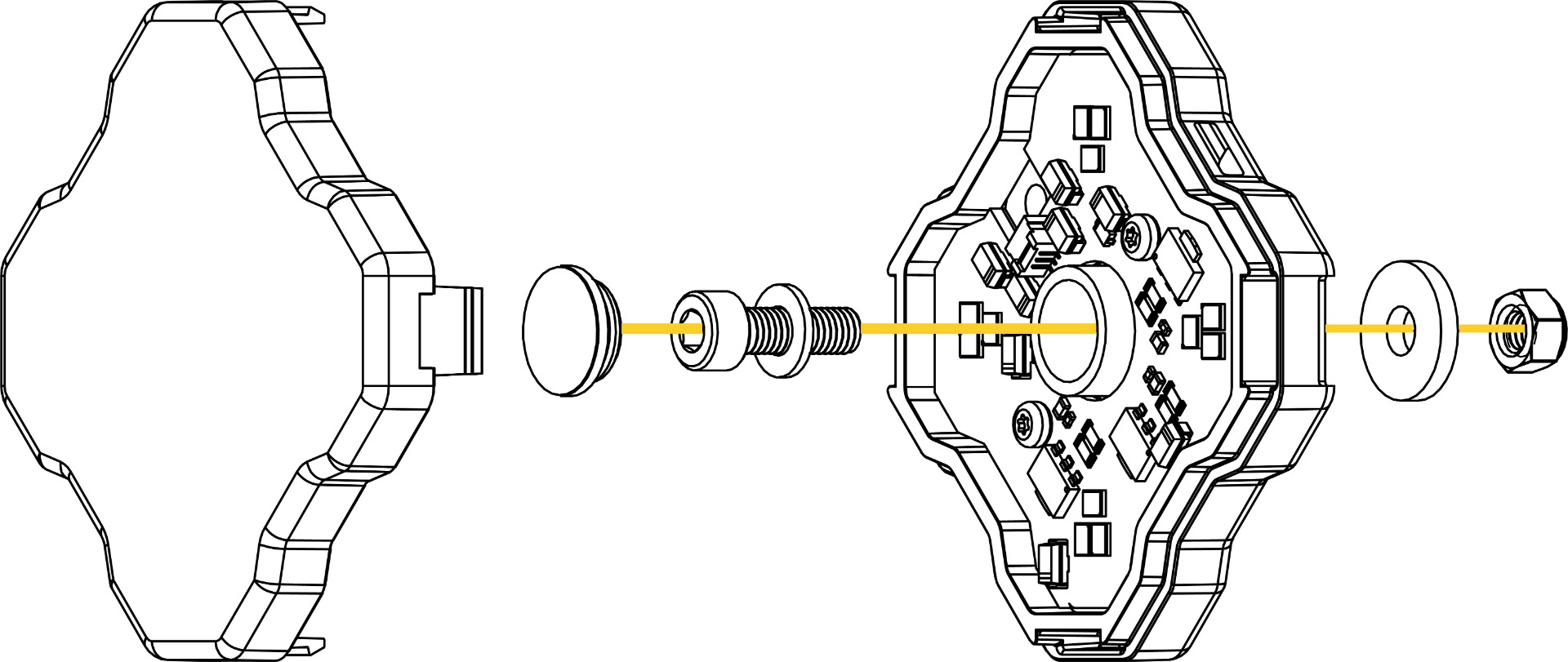
Remove the outer lens, then remove the centre rubber dust seal to expose the mounting point. Keep both parts clean for reassembly.
On a White/Red dual-colour light, a compatible Amber outer lens changes the White output to Amber while the Red output remains Red. Coloured lenses are included with the single-colour kits; do not assume they are included with every dual-colour kit.
3. Drill the centre mounting hole
For a centre-bolt installation, drill the chosen mounting surface with a 7/32-inch or 15/64-inch bit. Verify what is behind the surface first. An appropriate adapter installation may use a different mounting method.
4. Choose hidden or external wire routing
To hide the cable through the mounting surface, align the light and make the additional 3/8-inch opening in the required position. Otherwise route the lead beside the light. Protect the cable from sharp edges.
5. Fit the centre hardware
Install the supplied nut, bolt and washers in the order shown. Secure the light without damaging the housing or mounting surface.
6. Use the side tabs when appropriate
As an alternative, suitable attachment points can accept zip ties through the light’s integrated side tabs. Magnetic kits use their included magnetic adapters on a suitable surface; confirm the light and cable remain secure.
7. Reinstall the seal and lens
Refit the centre rubber dust seal and clip the outer lens securely into position. The seal must be in place before use.
8. Position the harness and control
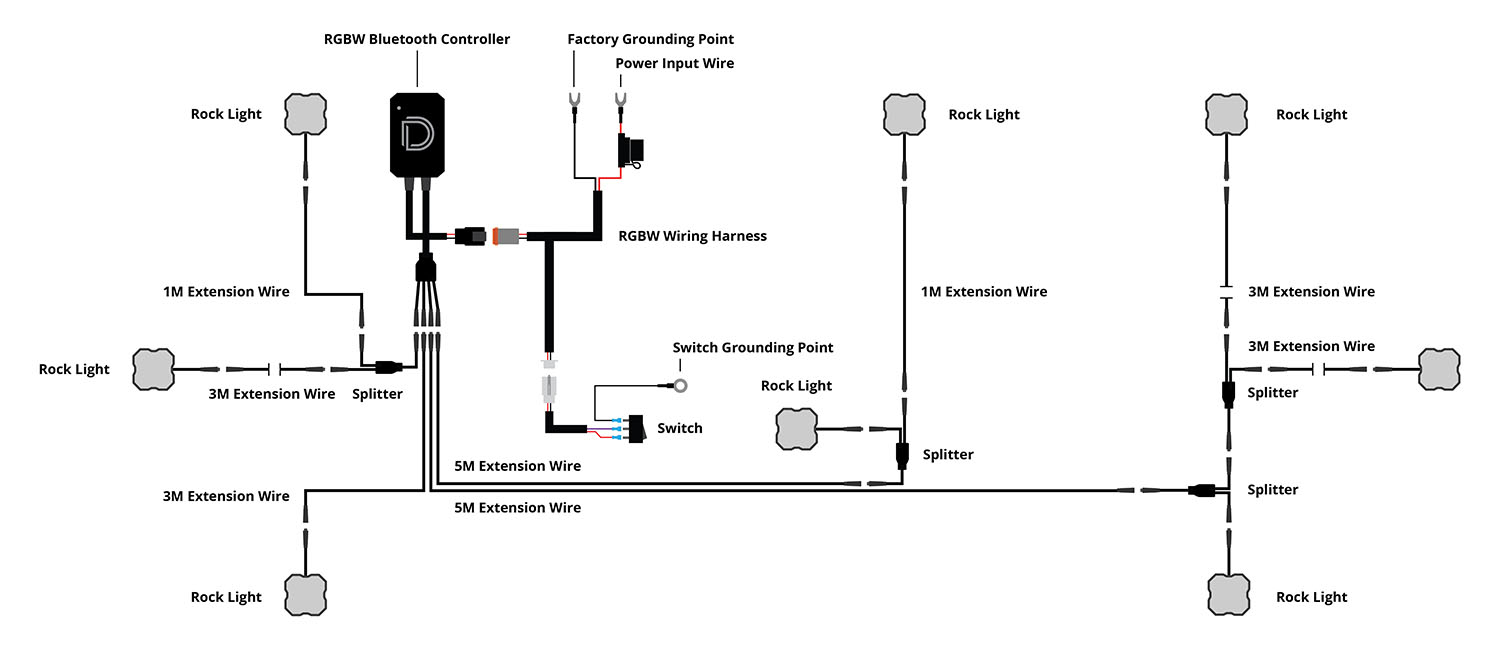
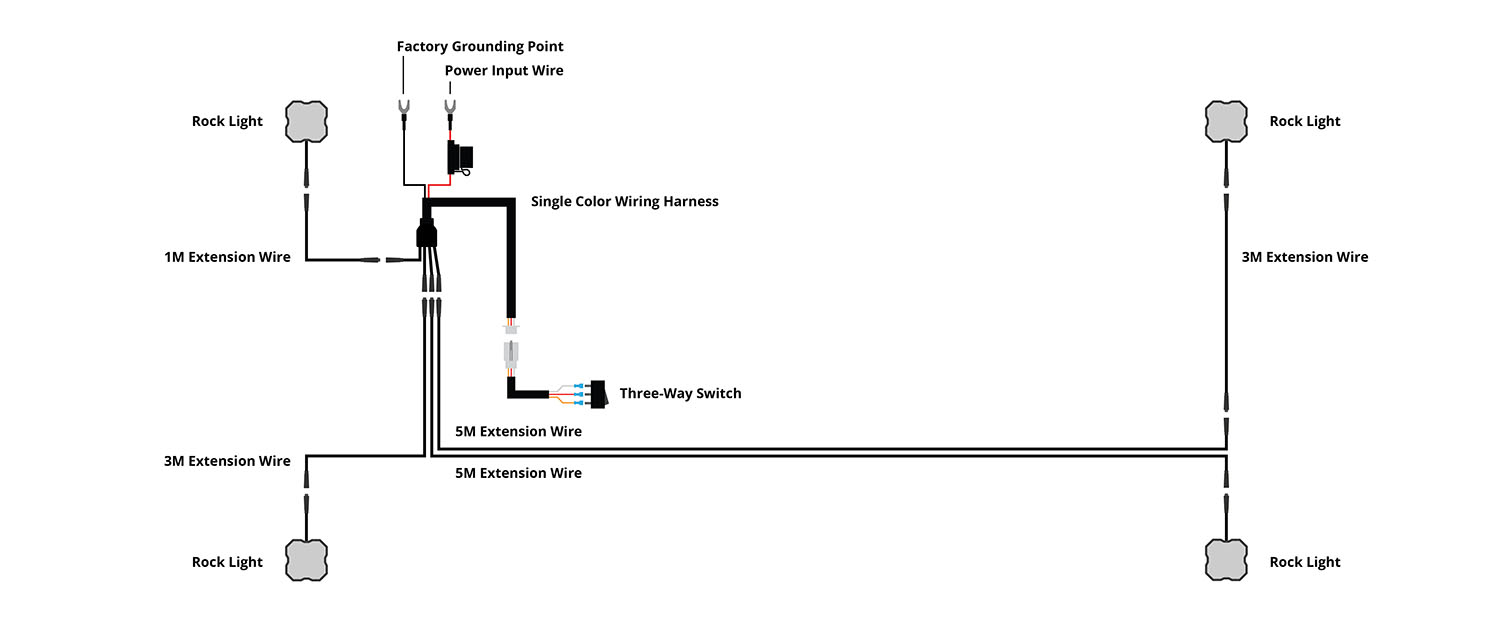
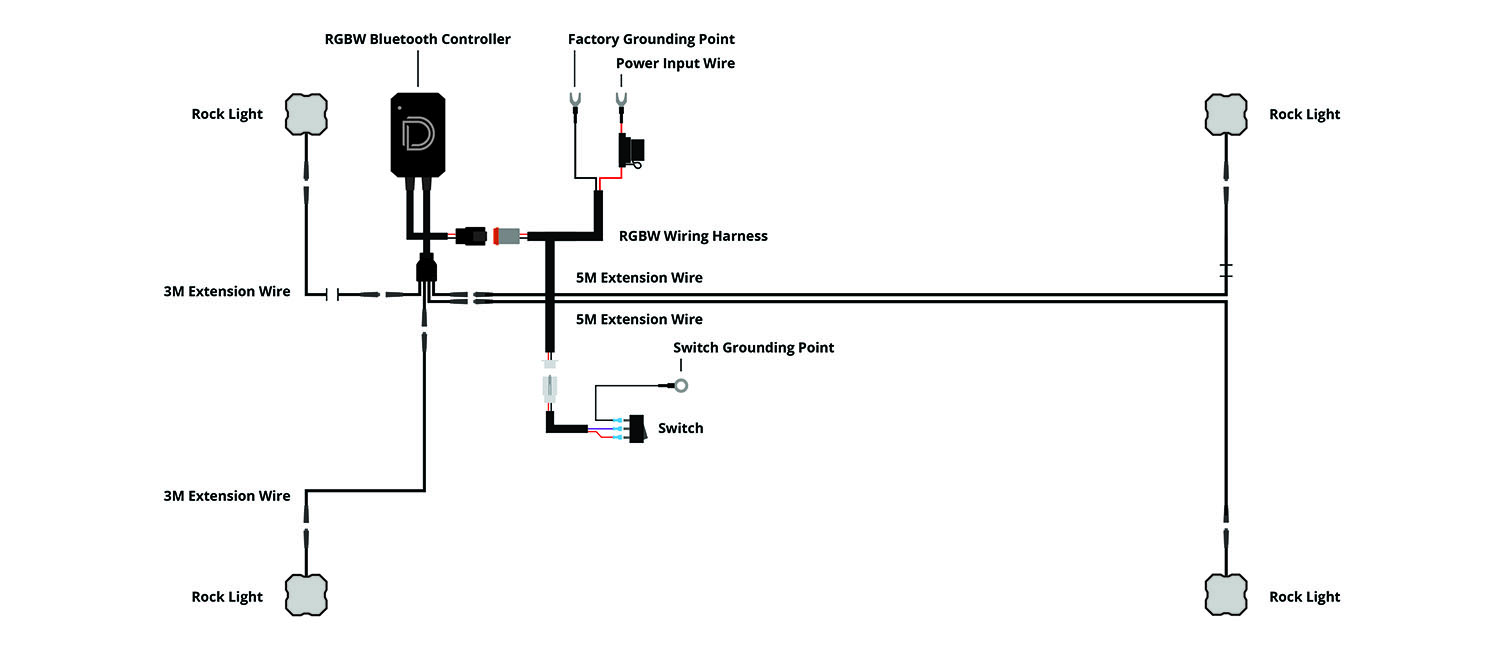
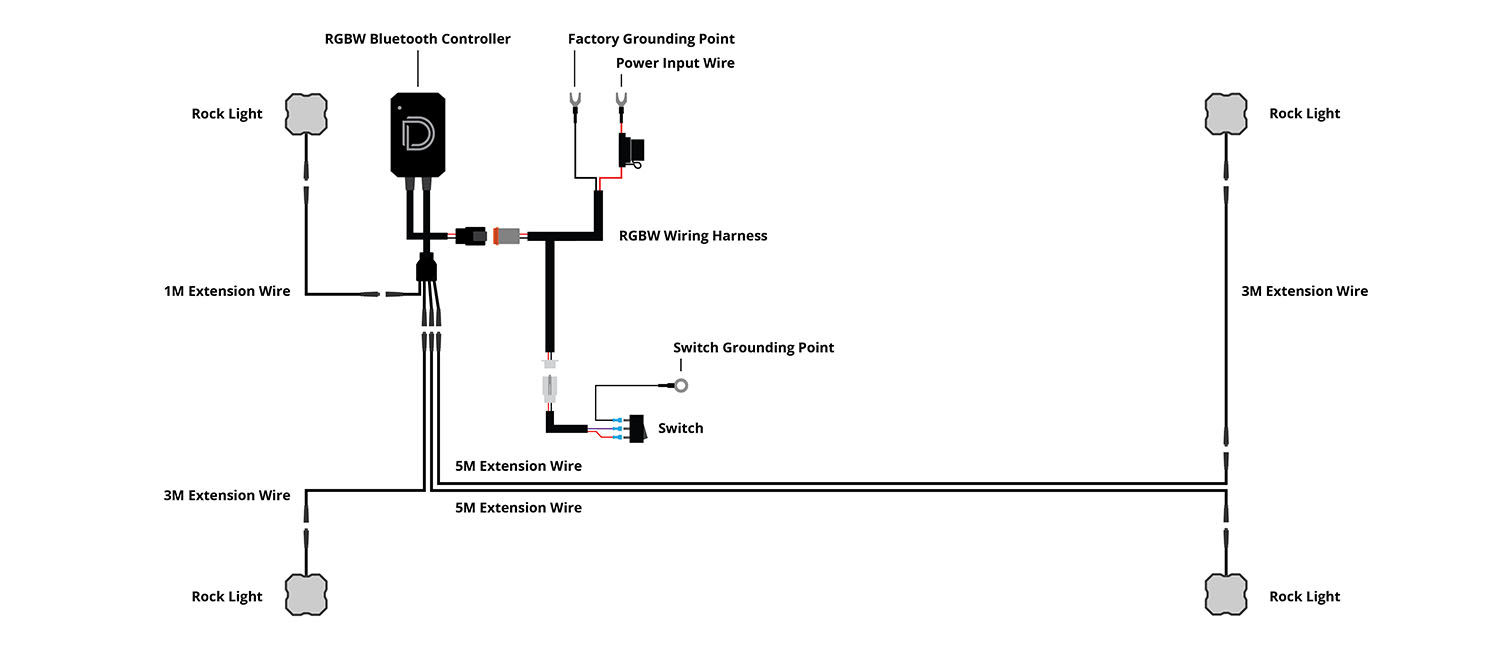
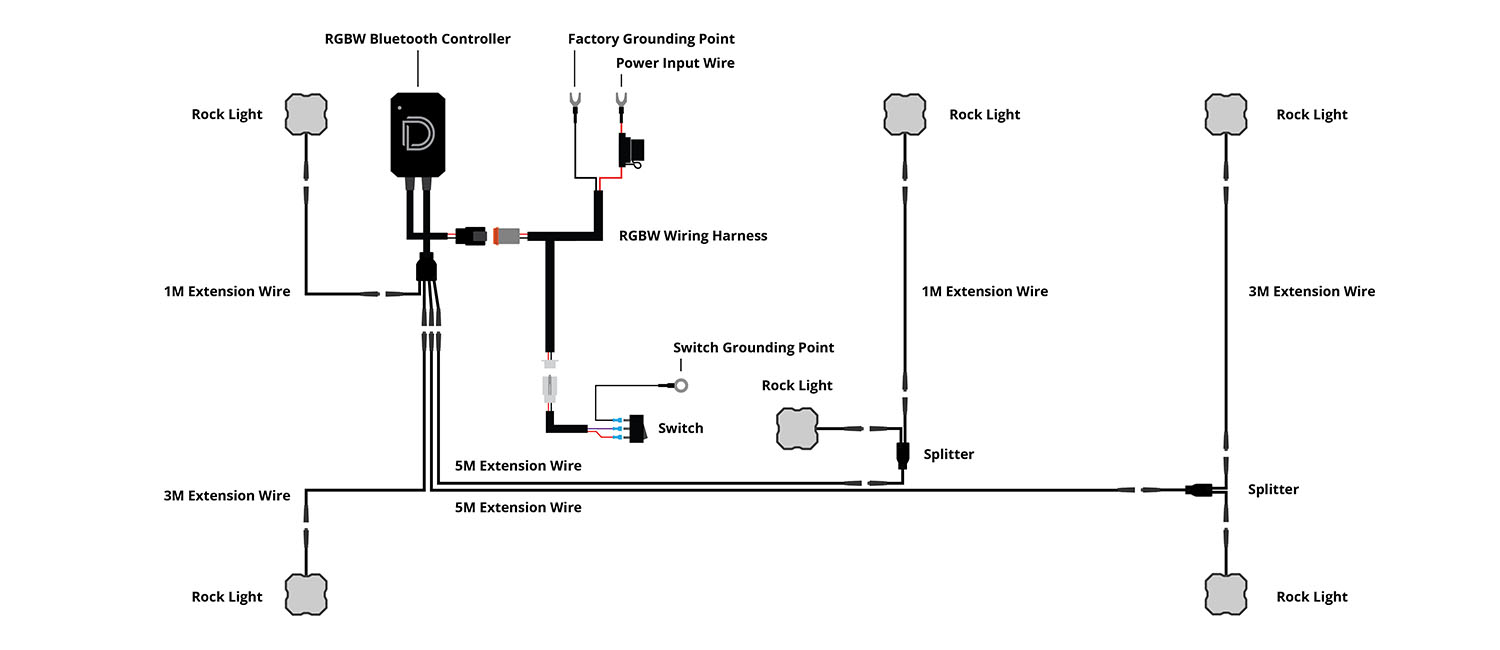
Choose an accessible location for the harness near the battery or main power point, and plan the switch/controller position. Single-colour and dual-colour kits use the three-wire setup. RGBW kits require the matching RGBW controller and harness.
9. Connect power and ground
With power isolated, connect the harness’s Red power-input lead to the positive battery or suitable main power terminal. Connect Black to the negative terminal or a suitable factory grounding point. Keep the supplied protection and connectors in the circuit.
10. Route the cabin switch lead
Where a physical switch is used, route its lead to the chosen cabin location. Follow an appropriate factory harness route and protect any firewall passage. Unplug the switch while routing if needed.
11. Mount and reconnect the switch
If the supplied physical switch requires a panel opening, make a 3/4-inch hole after checking clearance. Reconnect the switch leads; its Gold spade takes the Black ground wire. Follow the separate matching controller instructions for RGBW control.
12. Route the M8 extensions and splitters
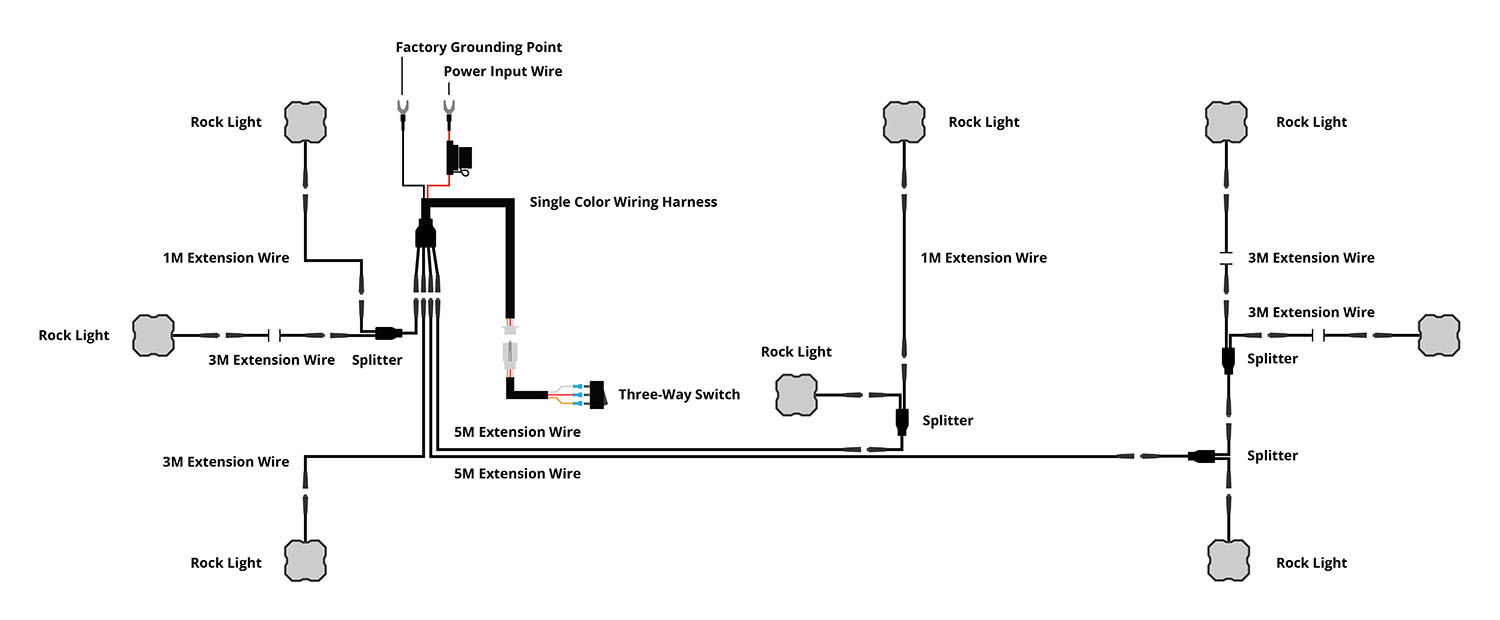
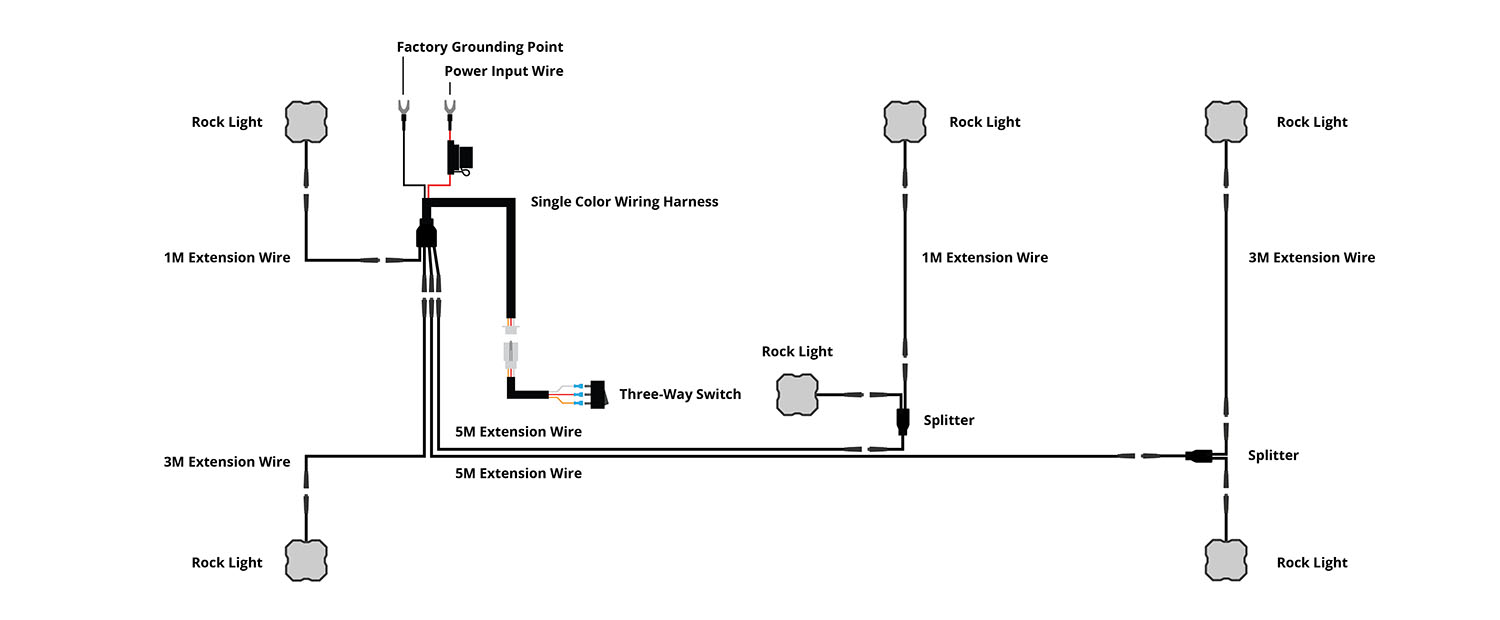
Use the layout for your light type and light count. Keep leads away from moving parts, hot components and sharp edges. When separating M8 connections, grip the connector housings close to the joint and use steady, even pressure; do not pull the wires.
Choose the matching wiring layout
The main eight-light layouts are below. For dual-colour lights, use the single-colour cable layout: the two switched outputs select White and the secondary colour instead of low and high output. The RGBW diagram requires a compatible controller even when your kit does not include one.
Other original four-light and six-light layouts
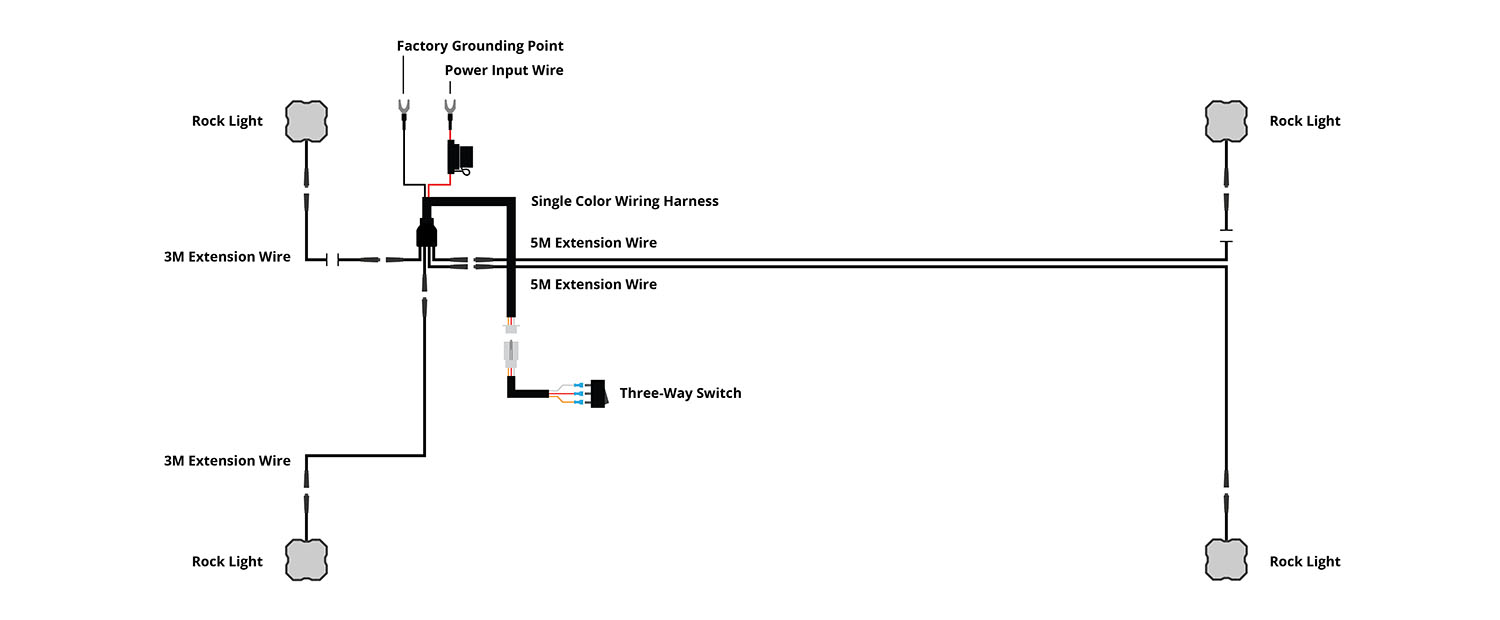
These diagrams are for the labelled smaller or expanded systems, not the contents of an eight-light kit. Use them only when the installed hardware matches the diagram.
13. Reconnect, test and secure
Reconnect the negative battery terminal following the vehicle procedure. Test each selected output or controller function, aim the lights for their purpose and secure excess wiring. Recheck mounts and clearance before driving.
Original instructions and kit choices
Diode Dynamics rock-light installation instructions
- Diode Dynamics Stage Series Single-Color LED Rock Light Kit (8-pack)
- Diode Dynamics RGBW LED Rock Light (8 Pack)
- Diode Dynamics RGBW Rock Light Installer Kit w/Controller (8-pack)
- Diode Dynamics RGBW Rock Light Installer Magnet Mount Kit (8-pack)
- Diode Dynamics RGBW Rock Light Installer Magnet Mount Kit w/Controller (8-pack)
- Diode Dynamics Dual-Color Rock Light M8 8-Pack
- Diode Dynamics Dual-Color Rock Light M8 Magnet 8-Pack