

BTS Lighting · Programming
Program F-150 Elite & Elite Max headlights
Set the DRL look, turn-signal style and welcome animation using the truck’s factory light dial and high-beam stalk. Elite Max adds its own auxiliary settings.
Before each programming sequence
These sequences apply to Elite and Elite Max for the qualified 2021–2023 F-150 application, with either Projector or Non-Projector adapters. They do not change which harness your truck needs. Finish the installation and aiming steps first.
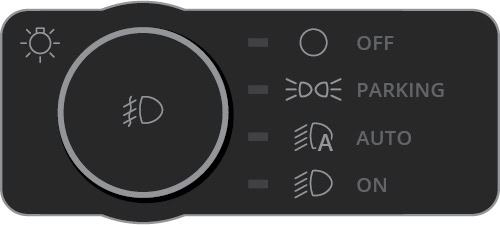
Park facing a window or reflective wall so you can see the feedback. Start with the vehicle off, the light dial at OFF and all exterior lights fully dark. After entering or leaving the truck, this can take 10–15 seconds.
Unless you are entering Show Mode, switch the auxiliary/off-road switch off too. Each “toggle” below is one quick OFF → PARK movement; return through OFF for the next one. If you lose count, return to OFF, wait 10 seconds, then restart.
Quick mode reference
| Setting | Quick OFF → PARK toggles | Auxiliary switch | Finish the entry sequence |
|---|---|---|---|
| DRL colour / style | 3 | Off | Leave in PARK |
| Turn-signal style | 4 | Off | Leave in PARK |
| Welcome on / off | 5 | Off | Leave in PARK |
| High Beam Boost · Max | 6 | Off | Leave in PARK |
| Low Beam Assist · Max | 7 | Off | Leave in PARK |
| Show Mode · Max | 3 | On | Leave in PARK |
| Factory reset | 15 | Off | End in OFF |
Settings on Elite and Elite Max
Choose DRL colour and style · Mode 3

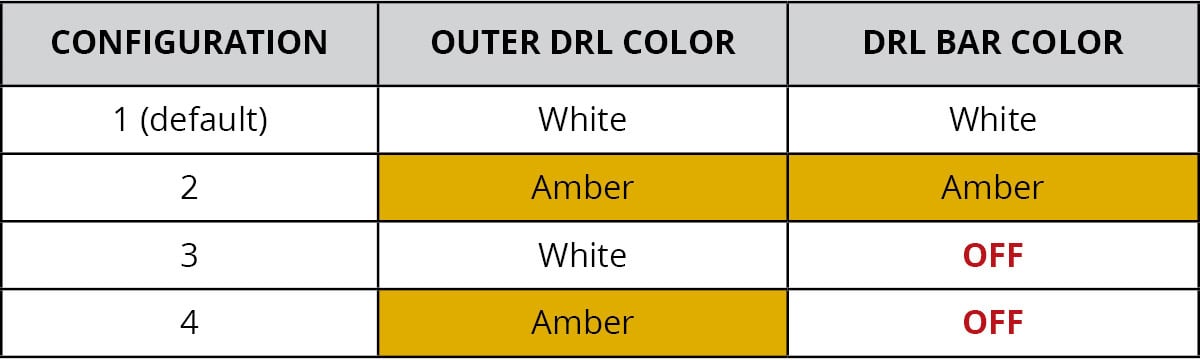
With all lights and the auxiliary switch off, make three quick OFF → PARK toggles, ending in PARK. Three DRL flashes confirm entry, followed by the current setting. Use the high-beam stalk to advance through the styles; the DRL flashes three times and previews each choice. Turn the dial OFF to save, then wait for every light to go out.
| Style | Outer DRL | DRL bar |
|---|---|---|
| 1 · default | White | White |
| 2 | Amber | Amber |
| 3 | White | Off |
| 4 | Amber | Off |
Choose the turn-signal style · Mode 4

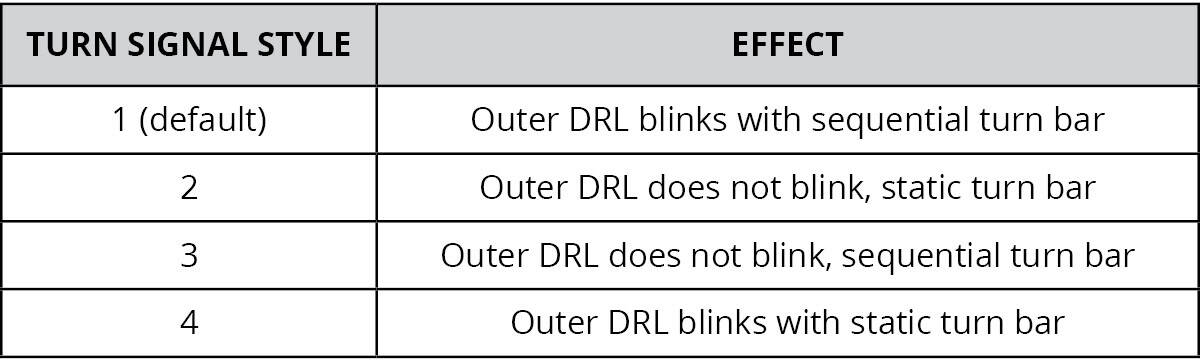
Begin with all lights and the auxiliary switch off. Make four quick OFF → PARK toggles, ending in PARK. Four DRL flashes confirm entry. Use the high-beam stalk to move through the signal styles. Each change is acknowledged by three DRL flashes before the signal demonstration. Turn the dial OFF and wait for all lights to go out to save.
In styles 2 and 3, the outer DRL does not flash with the turn signal; during daytime use it dims while the signal operates.
| Style | Outer DRL | Turn bar |
|---|---|---|
| 1 · default | Blinks | Sequential |
| 2 | Does not blink | Static |
| 3 | Does not blink | Sequential |
| 4 | Blinks | Static |
Enable or disable the welcome animation · Mode 5

From all lights off, make five quick OFF → PARK toggles, ending in PARK. Five DRL flashes confirm entry. Use the stalk to change on/off. Five flashes acknowledge the change: an enabled setting plays the animation; a disabled setting shows the parking lights without it. The default is on. Turn the dial OFF and wait for the lights to go out to save.
Animation not waking up? After the truck sleeps, press Lock then Unlock. Once it is awake, pressing Unlock can trigger the sequence again.
Elite Max auxiliary settings
High Beam Boost · Mode 6

This supplemental high beam can follow the factory high beams. Check the applicable requirements before enabling it; this guide does not make every auxiliary setting road-legal.
Start with all lights and the auxiliary switch off. Make six quick OFF → PARK toggles, ending in PARK. Six DRL flashes confirm entry. Use the high-beam stalk to turn Boost on or off. Six flashes acknowledge the change and the Boost pod displays the selected state. It is off by default. Turn the dial OFF and wait for all lights to go out to save.
Low Beam Assist · Mode 7

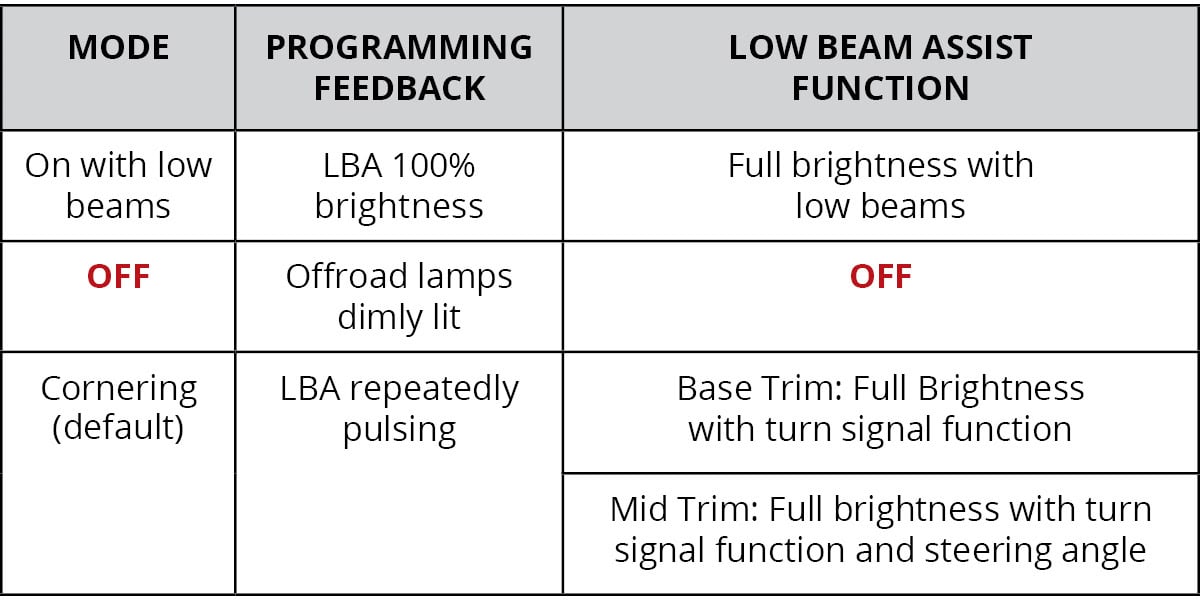
Low Beam Assist adds width beside the main low-beam pattern. Its choices are on with the low beams, automatic cornering, or off. Cornering responds to steering angle on mid/premium trims and to turn-signal activation on base trims.
Start with all lights and the auxiliary switch off. Make seven quick OFF → PARK toggles, ending in PARK. Seven DRL flashes confirm entry. Use the stalk to change the setting; seven flashes acknowledge each selection, followed by the feedback in the table below. Turn the dial OFF and wait for every light to go out to save.
| Setting | Programming feedback | During use |
|---|---|---|
| On with low beams | Assist at full brightness | Full brightness with the low beams |
| Off | Off-road lamps dimly lit | Assist off |
| Cornering | Assist pulses repeatedly | Responds to vehicle inputs; see trim behaviour above |
Check your current setting: Diode’s chart labels Cornering as the default, while its written guide says On with low beams. Check the displayed setting and select the behaviour you want.
Show Mode · stationary display
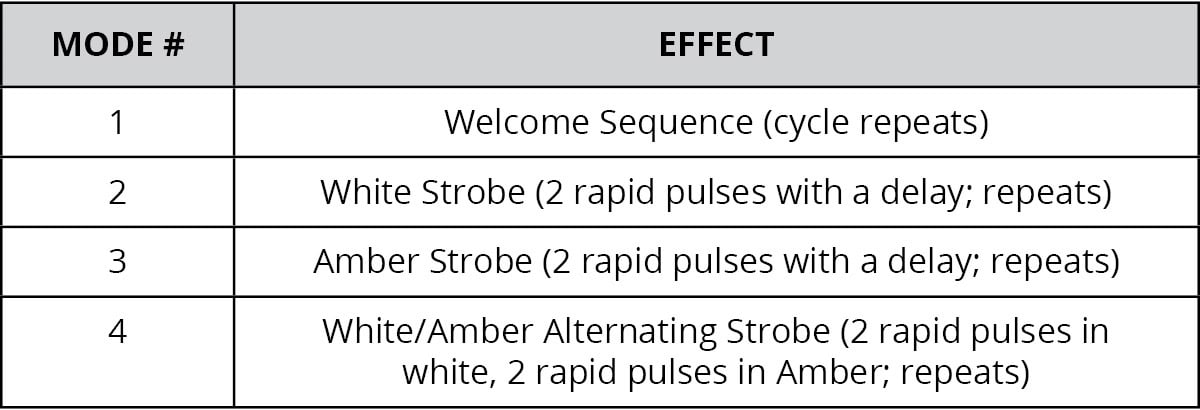
Turn the auxiliary/off-road switch on. Make three quick OFF → PARK toggles, ending in PARK. Show Mode starts by repeating the welcome animation. Use the stalk to move through its display choices. Switch the auxiliary/off-road switch off to exit.
| Mode | Display |
|---|---|
| 1 | Welcome sequence repeats |
| 2 | White strobe: two rapid pulses, a pause, then repeat |
| 3 | Amber strobe: two rapid pulses, a pause, then repeat |
| 4 | Alternating strobe: two white pulses, then two amber pulses; repeats |
Restore factory settings
Begin with all lights and the auxiliary switch off. Make 15 quick OFF → PARK toggles, ending in OFF after the final toggle. The signal bars flash white twice, then amber twice to confirm the reset. Turn all lights off before programming your preferences again.