A step-by-step companion to Diode Dynamics’ PP0194 instructions, using every original mechanical photograph plus the wiring and aiming diagrams. Applies to the 2021–2023 non-Raptor F-150 kit with two SAE Fog pods and two White Combo pods.
Allow the manufacturer’s estimated 1–2 hours and arrange a helper for the heavy bumper. You will need a T30 Torx driver, 7/8/10/13/21 mm sockets or ratcheting wrenches, trim-removal tool, pliers and a 4 mm or 5/32-inch hex tool for the pods.
Confirm the original bumper, fog-light type and selected kit before starting. Follow the vehicle manufacturer’s procedures for handling its electrical connectors and driver-assistance components. Diode’s guide does not supply bumper fastener torque values; use the correct vehicle service information.
Front camera: reconnect it before starting the truck. The current product instructions warn that starting with it disconnected can require camera recalibration.
Diode Dynamics’ exact DD7310–DD7315 installation demonstration. Follow the written diagram for the factory-halogen/LED wiring branch. The video predates the current limited-lifetime warranty policy.
Mechanical installation
Access the pockets and fit the pods
1. Release the upper bumper valance
Use a 7 mm socket to remove the two fender-liner screws at the upper valance. Release the side from the fender well and fender.
2. Remove the valance
Repeat on the other side. Work from the outside towards the centre, releasing the tabs until the valance comes away.
3. Remove the upper trim panel
Remove the 13 tree clips holding the radiator-support trim panel, then lift the panel away.
4. Disconnect the grille harnesses
Disconnect the harnesses near the hood latch and release the harness-retaining clip from the grille.
5. Remove the grille fasteners
Remove the four 10 mm screws at the top and the two 8 mm screws at the lower corners beside the headlights.
6. Take out the grille
Pull the grille away from the radiator to release it, then set it on a protected surface.
7. Release the large air-dam connector
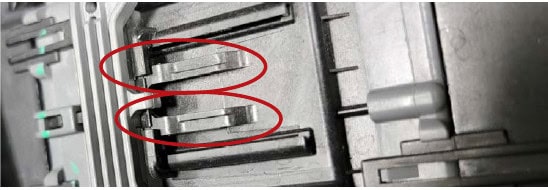
Push the dark-grey tab while lifting the light-grey handle to release the large body connector above the air dam. The original marked photograph identifies both parts.
Diode Dynamics PP0194, mechanical step 7: release the large air-dam connector. Original annotations retained. View full size
8. Unclip the air-dam harness
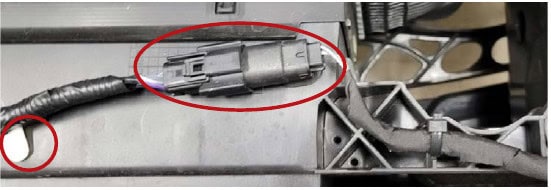
Disconnect the harness attached to the air dam and pull its retaining clip out of the air dam.
Diode Dynamics PP0194, mechanical step 8: unclip the air-dam harness. Original annotations retained. View full size
9. Undo the bumper nuts
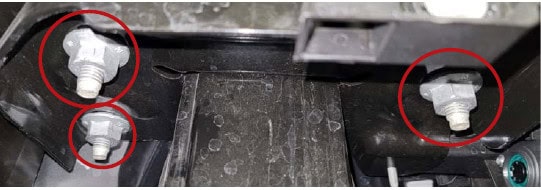
With the bumper supported, remove the six 21 mm nuts behind the bumper. The photograph marks the mounting positions.
Diode Dynamics PP0194, mechanical step 9: undo the bumper nuts. Original annotations retained. View full size
10. Remove the heavy bumper with help
Have a second person assist. Slide the bumper forwards off the tow hooks and frame; set it on a protected surface. Do not try to support it alone.
11. Remove the radar and lower trim
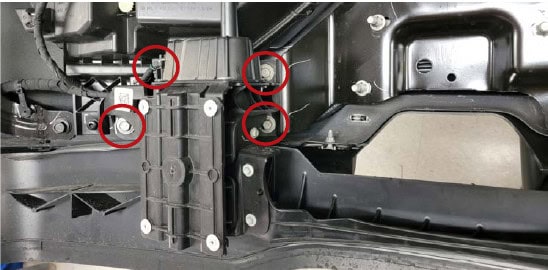
Disconnect the radar connector. Remove the three 13 mm bolts on each side, then lift the radar and lower trim away from the bumper.
Diode Dynamics PP0194, mechanical step 11: remove the radar and lower trim. Original annotations retained. View full size
12. Remove the original fog lamp
Unplug the fog lamp, remove its four T30 screws and lift it out. Remove and retain the 13 mm strut bolt for reuse.
Diode Dynamics PP0194, mechanical step 12: remove the original fog lamp. Original annotations retained. View full size
13. Fit the pod mounting hardware
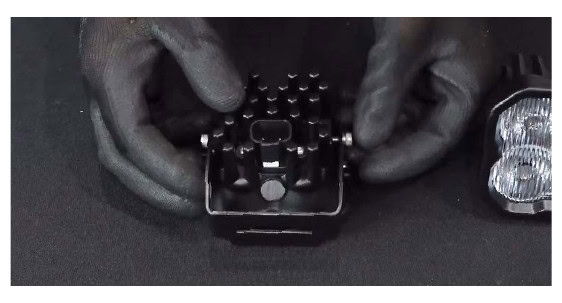
Use the supplied hardware and a 4 mm or 5/32-inch hex bit to fit the SS3 mounting brackets. Keep each pod’s DT power connector at the bottom.
Diode Dynamics PP0194, mechanical step 13: fit the pod mounting hardware. Original annotations retained. View full size
14. Secure the pods to the vehicle brackets
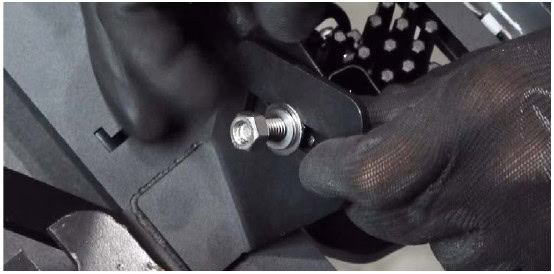
Use a 13 mm wrench to secure the SS3 pods to the fog-pocket brackets. Leave the adjustment suitable for final aiming.
Diode Dynamics PP0194, mechanical step 14: secure the pods to the vehicle brackets. Original annotations retained. View full size
15. Install the fog-pocket bracket
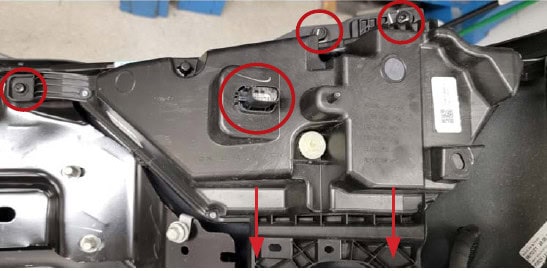
Secure the vehicle bracket with the factory hardware removed earlier. Diode’s guide notes that two original Torx screws remain unused.
Diode Dynamics PP0194, mechanical step 15: install the fog-pocket bracket. Original annotations retained. View full size
16. Complete the other side
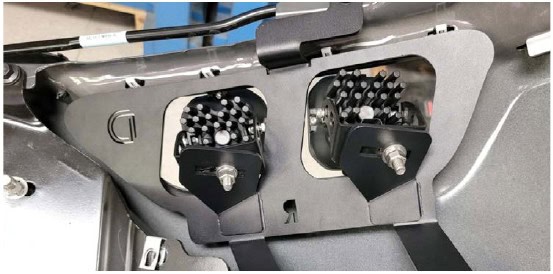
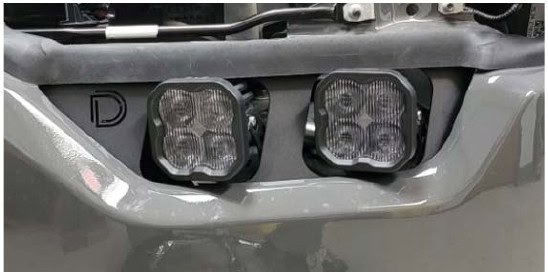
Repeat the fog-lamp removal and pod/bracket assembly on the other side. Both pockets should now contain the separate Fog and Combo pods.
Diode Dynamics PP0194, mechanical step 16: complete the other side. Original annotations retained. View full size
Wire the three functions separately
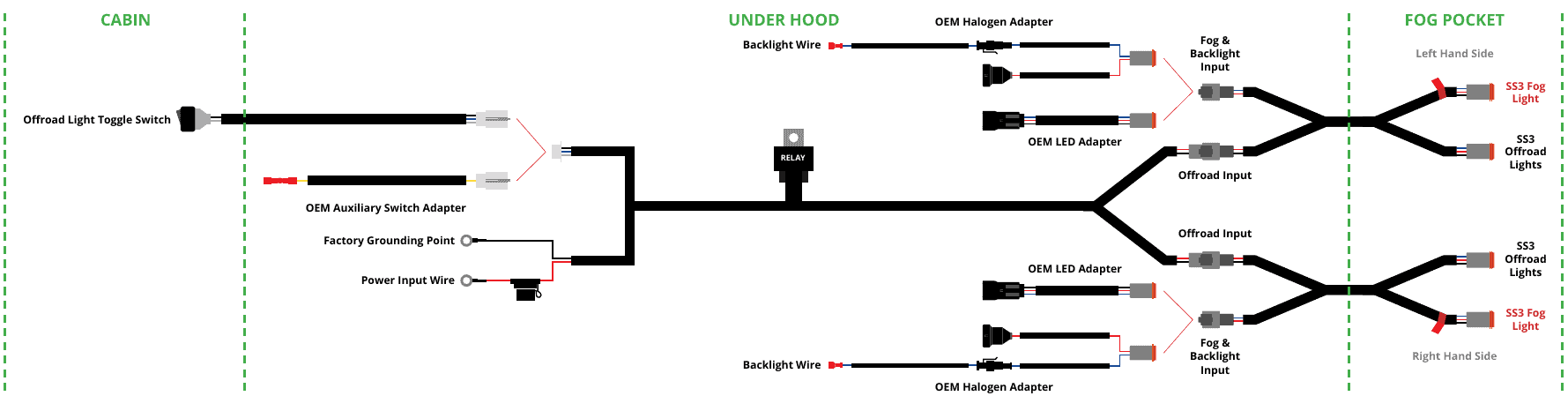
The Fog pods follow the factory fog circuit. The Combo pair uses the battery-fed off-road harness and a separate toggle or factory auxiliary control. The amber backlight has its own connection. Match the original halogen or LED adapter branch; they are alternatives, not connections to use together.
Complete original PP0194 wiring diagram. Use the OEM Halogen or OEM LED adapter branch that matches your truck; the red-flagged output goes to the SAE Fog pod. View full size
Position the off-road harness. Place its relay near the under-hood fuse box and route one output to each fog pocket. If using the supplied toggle, route its switch wiring into the driver-side cabin. Keep wiring clear of heat and moving parts, following the factory harness route where practical.
Connect the main supply. Follow the diagram to connect the harness positive and negative supply wires to the battery or suitable main terminals near the fuse box. This is the off-road power harness, not the separate halogen backlight trigger.
Choose the off-road control. Connect the toggle’s matching wire colours and mount it in a suitable unused dash location. For a factory auxiliary switch, replace the toggle adapter with the OEM auxiliary-switch adapter and crimp its butt connector to the selected upfitter control wire. The harness still takes its load power from the battery.
Connect the factory fog input. Select the adapter for the original halogen or LED fog lamps. Plug it into the factory fog socket and the appropriate splitter input. With factory halogen fogs, connect the backlight trigger to a fused 12 V source—not directly to the battery. The guide recommends the blue/grey headlight sidemarker wire and supplies T-taps for that connection.
Connect the off-road inputs. Attach the off-road harness output to the splitter on each side.
Connect each pod correctly. The splitter output marked with a red flag goes to the SAE Fog pod. The other main-beam output serves the off-road Combo pod.
Secure and check the wiring. Test Fog, Combo and amber backlight operation separately before final reassembly. Confirm the supported original fog/turn-signal function.
Reassemble the front end. Reverse the relevant removal steps, reconnect every disconnected harness and refit the radar/trim, bumper, grille and valance. Restore the front-camera connection before starting the truck.
Aim the SAE Fog pair
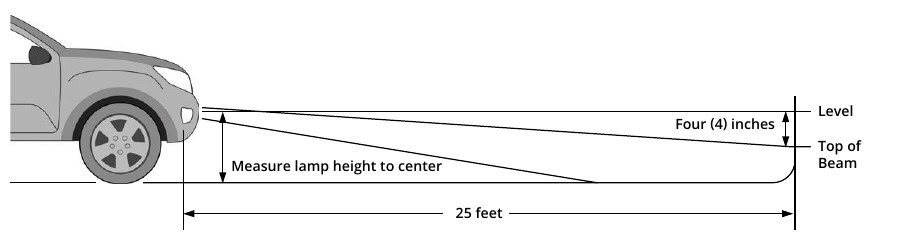
Use the manufacturer’s aiming procedure after the truck is reassembled. This diagram describes the Fog beam cutoff, not the Combo off-road beam.
Original fog-light aiming diagram: level ground, 25 feet from the wall, with the cutoff mark four inches below lamp-centre height. View full size
Park on level ground, facing a wall or garage door from 25 feet away.
Loosen the 5/32-inch adjusters on both sides of each Fog pod only enough to allow adjustment.
Measure the height from the ground to the centre of the Fog pods.
Mark that lamp-centre height on the wall with tape.
Add a second tape line four inches below it for the cutoff target.
Aim the top of the Fog beam at the lower line on each side.
Tighten the adjusters by hand to secure the setting. Do not overtighten or use power tools to torque them down.
Confirm the final aim and installation meet the requirements where you drive. Keep the separate Combo pair for off-road use.
Final checks
All bumper, grille, radar/trim and valance hardware restored using the applicable vehicle service information
Front camera, bumper and other disconnected wiring reconnected
Fog, Combo and backlight functions tested independently
Harnesses secured away from hot or moving components
Instructional photographs and diagrams: Diode Dynamics PP0194. This BTS guide retains the original illustrated connector and fastener references; the manufacturer PDF remains available for reference.