

BTS INSTALLATION GUIDE
2014–2024 Toyota 4Runner Tail as Turn installation guide
2014–2024 Toyota 4Runner with USDM factory taillight wiring. Modules fit the listed TRD models, but the Stage 2 XPR backup-bulb package is not for TRD Pro or TRD Off-Road.
Before you begin
Plastic trim tool, 10 mm socket; pliers for the optional additional-backup connection.
Confirm that the kit, vehicle equipment and supplied instructions match before dismantling. Work with the vehicle safely parked and support any removed bodywork. Stop if connectors or mounting points differ from the shown application.
Manufacturer video
Tail as Turn® + Backup LED Module for 2014+ Toyota 4Runner by Diode Dynamics. Video loads only when selected.
1. Access the factory taillight
Remove the rear interior access panel with a plastic trim tool. Remove the two 10 mm fasteners holding the taillight.
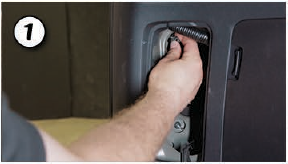
2. Disconnect and remove the assembly
Press the connector release and unplug it. Pull the taillight directly rearward from its locating mounts.
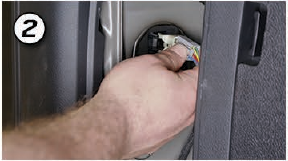
3. Install the modules inline
Connect the module between the factory wiring and taillight. Reinstall the light and its fasteners; repeat on the other side. This completes the module-only installation.
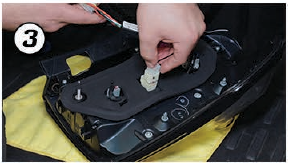
4. Identify the former turn-signal lead
Only continue for the optional additional-backup conversion. Identify the module lead connected to the original turn-signal socket, as shown in the source photograph.
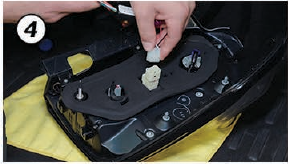
5. Identify the green reverse wire
Locate the green backup-light wire on the module. Use the manufacturer’s illustrated wire identification; do not select a vehicle wire solely by a guessed colour.
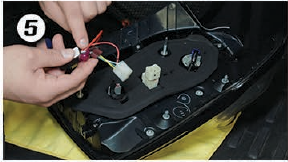
6. Attach the supplied T-tap
Place that green wire in the connector’s metal groove, fold the T-tap around it and close it with pliers as directed.
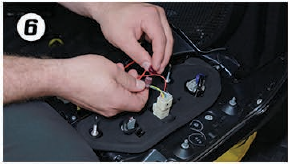
7. Connect the former turn lead
Plug the identified turn-signal lead into the T-tap. Repeat on the other module and reconnect the modules.
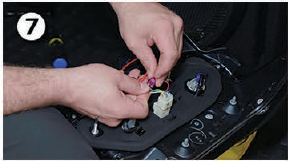
8. Install compatible white LEDs and test
Replace the former turn-signal bulbs with the compatible white LEDs included in the selected Stage package. Incandescent bulbs must not be used for this additional-light conversion because they draw too much current. Check tail, brake, turn and reverse operation. Module resistors can become hot during prolonged turn-signal use.
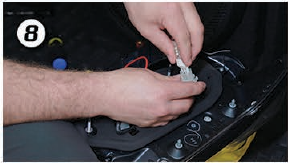
Original manufacturer sheet
Open the original Tail as Turn installation PDF. The optional-backup instructions follow the module-installation instructions on the same sheet.
Choose or check your kit
Return to the product and its exact options. Explore Toyota 4Runner lighting
Plan your 4Runner lighting
Planning a 2014–2024 4Runner installation? Match the exact product and vehicle instructions before starting.
Shop 2014–2024 4Runner lighting · Read the 4Runner buying guide