

BTS installation guide · DD8568 / DD8782
Install the Tacoma D-Switch hub and wiring
Mount the brackets, relocate the clutch reservoir when fitted, connect the controller and plan each accessory circuit.
Match the kit and prepare the truck
For 2016–2023 Toyota Tacoma. The bracket uses factory mounting points beside the fuse box. On trucks with a clutch reservoir, the reservoir moves onto the new bracket as shown in the guide.
The engine-bay bracket uses existing holes. Controller placement inside the cab and wiring routes can require separate work; check behind surfaces before drilling.
Use a 10 mm socket/wrench plus 12 mm and 13 mm wrenches for the bracket work. Controller/electrical installation may also need Phillips #1/#2 drivers, an 8 mm socket, T10 Torx and suitable connection tools. Follow the vehicle service procedure to safely isolate its 12V supply. Keep routing clear of heat, movement, sharp edges and airbag/control systems.
1. Move the clutch reservoir, if fitted
Use a 10 mm wrench to detach it from the side panel. Move it toward the firewall to make room for the bracket.
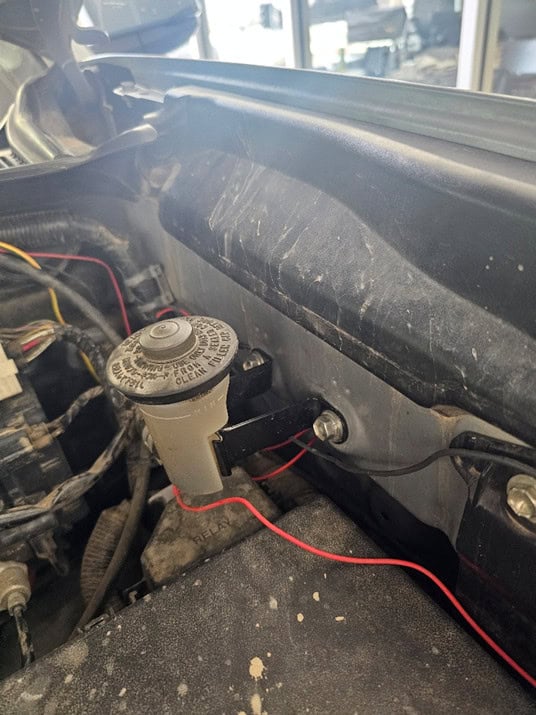
2. Replace the lower ground bolt
Remove the ground bolt below the fuse box with a 10 mm wrench. Fit the supplied screw, leaving about ½ inch of thread exposed.
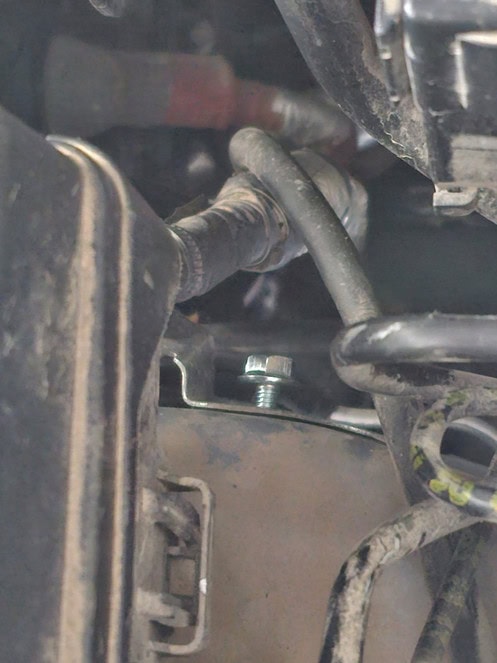
3. Start the first bracket
Place its forked end downward over the new screw. Leave the fastener loose enough for adjustment.
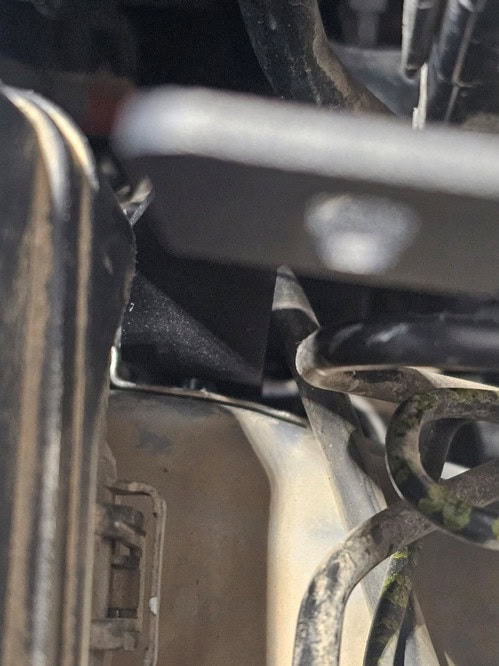
4. Attach the side-panel bracket
Use the original reservoir fasteners when the reservoir is fitted; otherwise use the screws supplied in the kit.
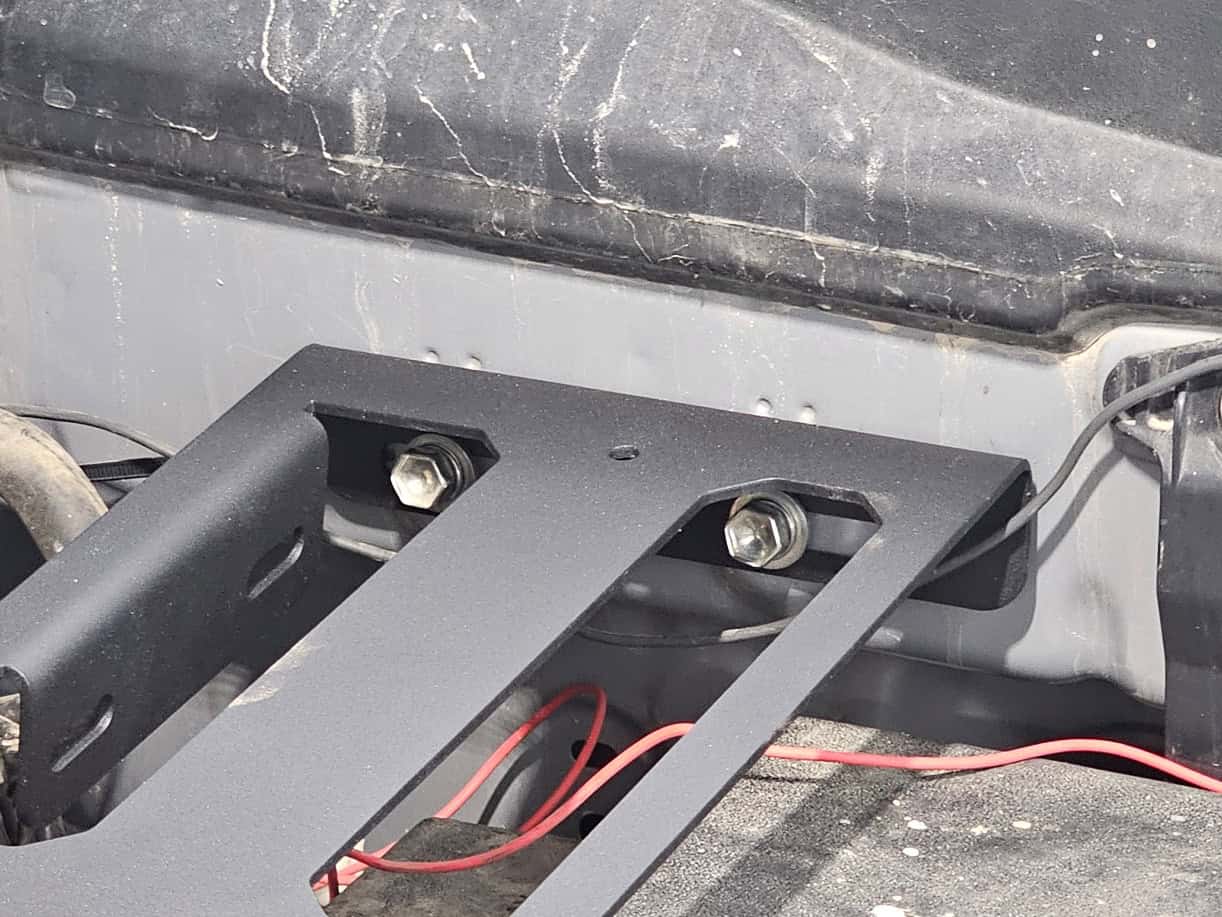
5. Relocate the reservoir and join the brackets
If fitted, attach the reservoir to the rear flange with the supplied screws and nuts, using 12 mm and 13 mm wrenches. Join both brackets using the included hardware and 10 mm tools.
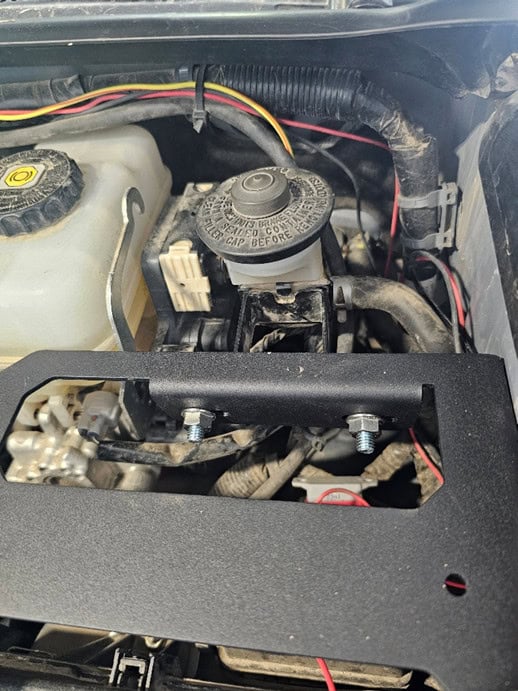
6. Tighten and fit the hub
Secure all remaining fasteners, including the ground and side-panel bolts. Attach the hub with the fasteners supplied with the D-Switch.
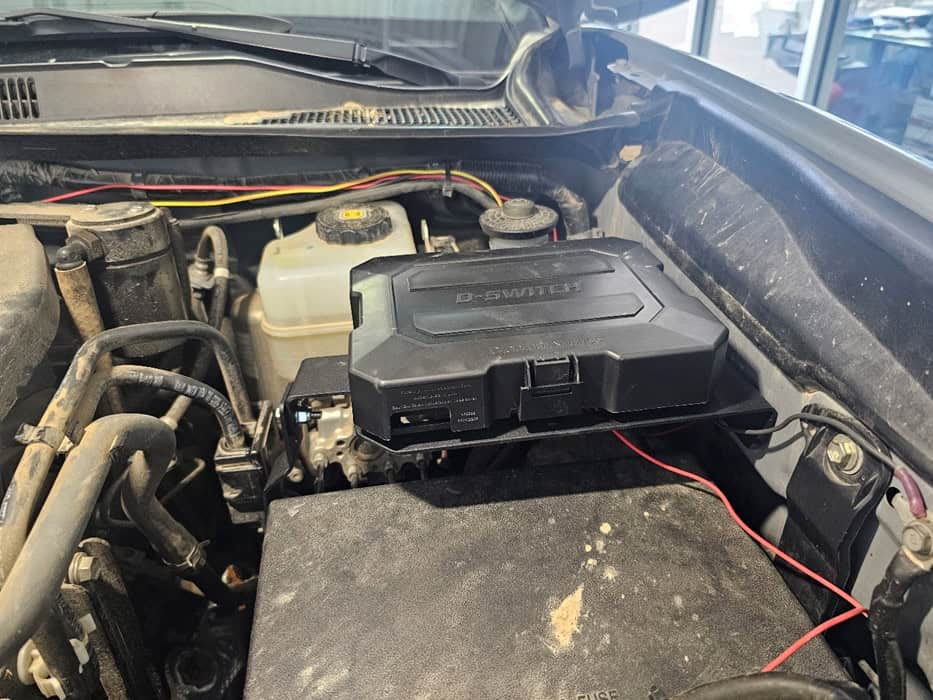
Mount the controller where it is easy to reach
Choose a visible, accessible location inside the cab. The universal bracket provides angle adjustment; a flush mount uses the four rear screw holes. Check behind the surface before any drilling.
Universal bracket
- Use the bracket to mark the mounting holes.
- Assemble the controller and bracket with the supplied hardware.
- Secure the bracket to the chosen surface, set the viewing angle and tighten its hardware.
Flush mounting
The manual specifies 9/64-inch screw holes and a 7/8-inch centre wire hole. A thicker surface may need separately supplied M3 ×0.5 screws. Confirm those dimensions against the actual hardware and installation surface before drilling.
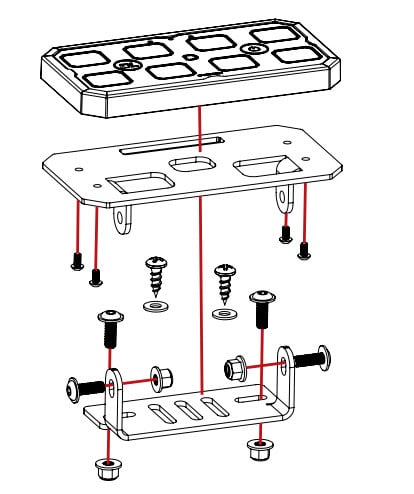
The engine-bay bracket’s no-drill claim does not apply to these cab mounting choices.
Connect the battery cable and controller harness
- With the electrical supply safely isolated, attach the included 4AWG cables to the hub’s labelled positive and negative terminal blocks. Match polarity.
- The cables are directional: the 1/4-inch lugs go to the D-Switch and the 3/8-inch lugs go to the battery. Keep the positive cable’s fuse block near the battery. The current manual specifies a 125A fuse.
- Route the cables through the hub-lid opening and connect them to the correct vehicle 12V battery terminals using the vehicle’s service procedure. Longer cables are required if the battery location is outside the engine bay.
- Connect the controller harness to the 3-metre extension and route it to the hub harness. Align the arrows and DD logos on the M8 connectors; do not force them.
- If needed, connect the hub harness’s white 4-pin connector to the hub. Its separate M8 branch connects to the accessory/sensor harness.
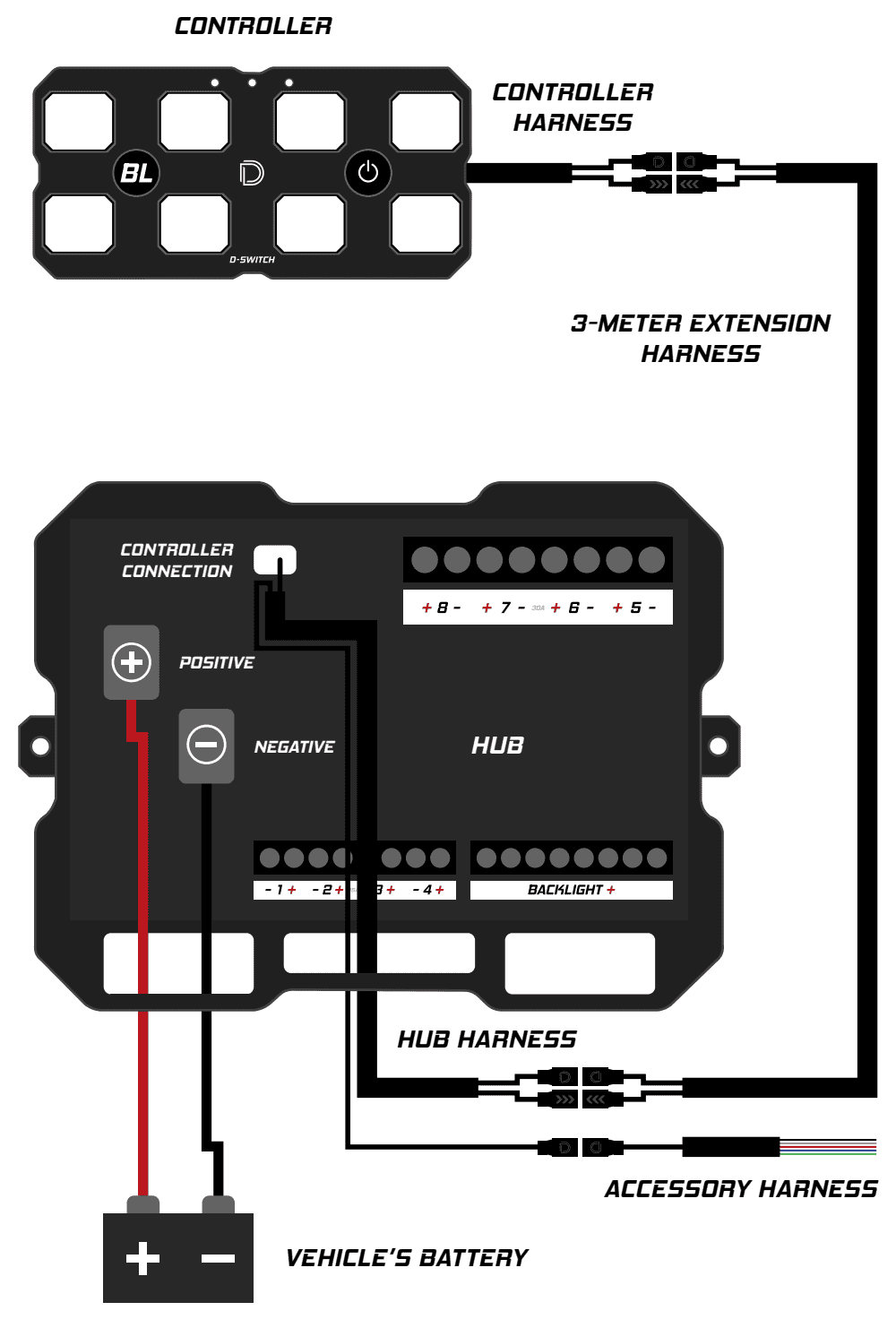
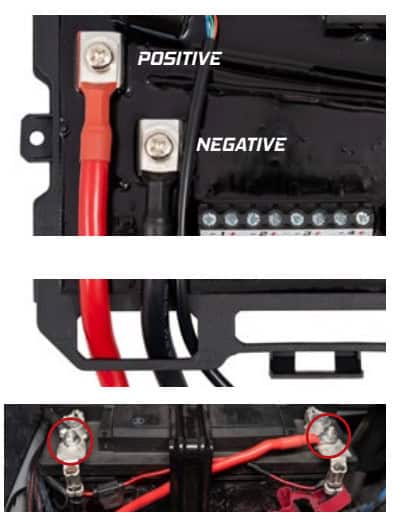
The diagram shows circuit relationships, not a complete Tacoma cable-routing plan. Protect and secure the wiring, and retain access to the battery and fuse box.
Connect only verified 12V sensor signals
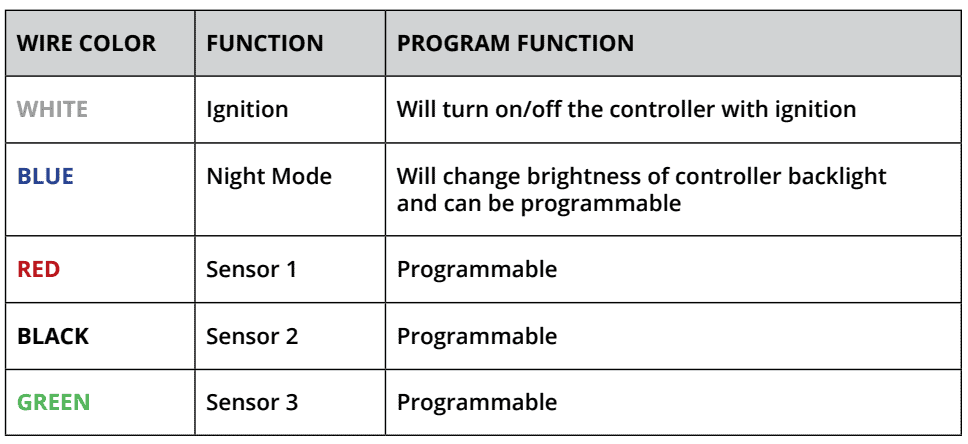
The accessory harness has five bare leads. These are low-current sense inputs, not accessory-power outputs. Verify the actual vehicle signal with a voltmeter; do not tap CAN, LIN, CXPI or another message-based circuit.
- White
- Ignition: follows vehicle ignition for controller operation.
- Blue
- Night Mode: changes controller illumination and can also be assigned to outputs.
- Red
- Programmable Sensor 1.
- Black
- Programmable Sensor 2. This black sense lead is not the main battery-ground cable.
- Green
- Programmable Sensor 3.
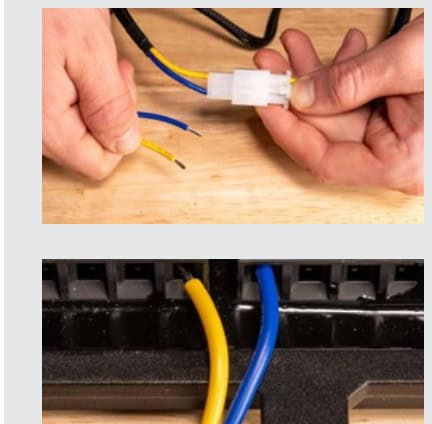
Connect the accessory harness to the hub harness with its aligned M8 connector. Use only the desired inputs and protect unused ends. The supplied quick splices are specified for 18–22 AWG wire: seat the sense lead in the stopped inner groove and the verified vehicle wire in the through groove, press the metal contact fully with pliers, tug-check both wires and close the latch. Use an appropriate connection method if the vehicle wire is outside that size range.
The manufacturer suggests a suitable parking-light or sidemarker 12V signal for Night Mode; this is not a claim that every Tacoma lamp wire supplies a compatible signal.
Match each accessory to the correct output
- Main outputs
- Channels 1–4: 15A each. Channels 5–8: 30A each.
- Backlight circuit
- Eight connection positions on a separate bus, 15A total.
- System maximum
- 125A total; individual channel limits still apply.
- Electrical supply
- 12V vehicle accessories; operating range 9–16VDC.
- Protection
- Adjustable electronic channel limits plus a 125A fuse on the battery cable.
- Weather resistance
- IP67-rated hub/controller electronics, excluding wiring terminals.
- Controller size
- 5.06 ×2.66 ×0.45 inches.
- Hub size
- 8.33 ×6.26 ×1.79 inches.
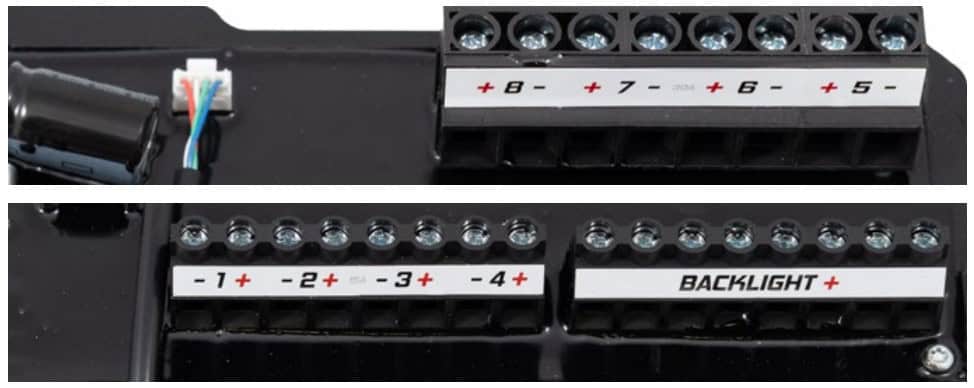
- Identify each accessory’s rated current, polarity and any required relay harness before connecting it.
- Loosen the selected terminal counterclockwise with a Phillips screwdriver, route its bare leads through the base opening, and place them in the labelled positive (+) and negative (−) terminals.
- Tighten clockwise until snug and gently tug-check each lead. Connect compatible accent/backlight leads to the separate backlight bus, respecting its 15A combined limit.
- Use a suitable separately powered HD/UHD relay harness for a load above 30A. The harness aux-adapter replaces its toggle switch so the D-Switch controls the relay. Do not route that high load directly through a D-Switch output.
Relay-controlled loads are on/off only. Do not apply PWM dimming to a mechanical relay. Check compatible-load requirements before using any flashing or dimming function.
Finish with one circuit at a time
- Check all mounting hardware, cable protection, polarity and connector seating. Close the hub and ensure terminals are protected.
- Restore the vehicle 12V supply according to the service procedure.
- Use the programming guide to label circuits, link buttons and set current limits within each channel’s rating.
- Test each output individually, then verify ignition and any installed sensor functions. Confirm that lights used on public roads operate in an appropriate road setting.
Pair and configure the D-Switch
Once the electrical checks pass, use the universal programming guide to pair the app, assign outputs, set current limits and configure sensor inputs. It also covers firmware, controller illumination, accessory backlights and compatible CarPlay/Android Auto setup.
Open the D-Switch programming guide
Manufacturer overview of the universal hub and controller. Follow the Tacoma-specific mounting guide for the engine-bay bracket.
Original instructions
Original Tacoma mounting instructions · Original PP0236D user manual