

BTS workshop guide · DD5169 / DD5170
Install Elite fog lights on your 2021–2023 F-150
Choose the wiring path for your truck, keep the original fasteners organised, and finish by aiming the new lamps. These instructions cover the White and Selective Yellow Elite fog-light pairs.
Before you start
This guide covers the 2021–2023 F-150 with factory fog lights, excluding Raptor. A truck without factory fog lights needs a separate hardware and wiring assessment.
Tools
Ratchet; 4, 7, 8, 10, 13 and 21mm sockets; T30 Torx driver; pliers; plastic trim tools; tape and a tape measure. Use a torque wrench for the specified bumper-nut torque.
Kit contents
Two fog lights, communication wires, halogen fog adapters, constant-power harness, sealing plugs and aiming tool. The supplied harnesses used depend on your truck’s original lighting.
Allow about 1–2 hours according to Diode Dynamics. Protect the painted trim and support the bumper during removal. Identify your factory headlight and fog-light types before choosing the wiring branch.
Step 1 of 32
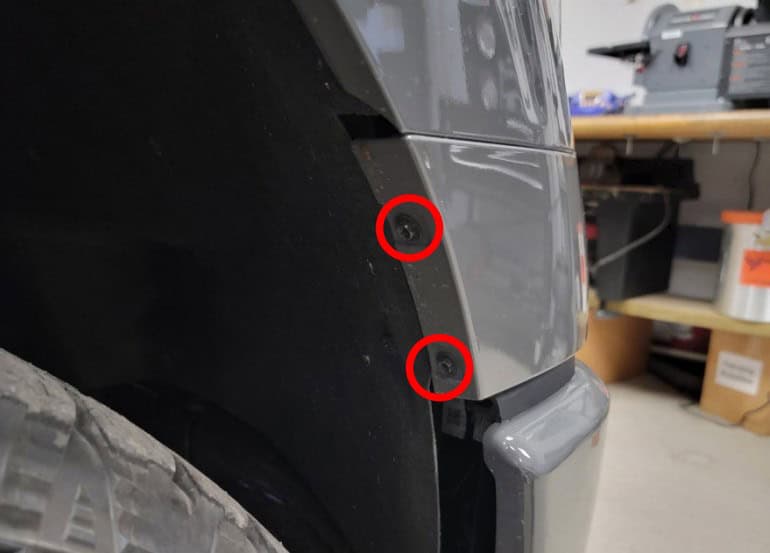
Release the fender-liner edges
On each side, remove the two 7mm bolts that secure the front fender liner to the fender wall.
Step 2 of 32
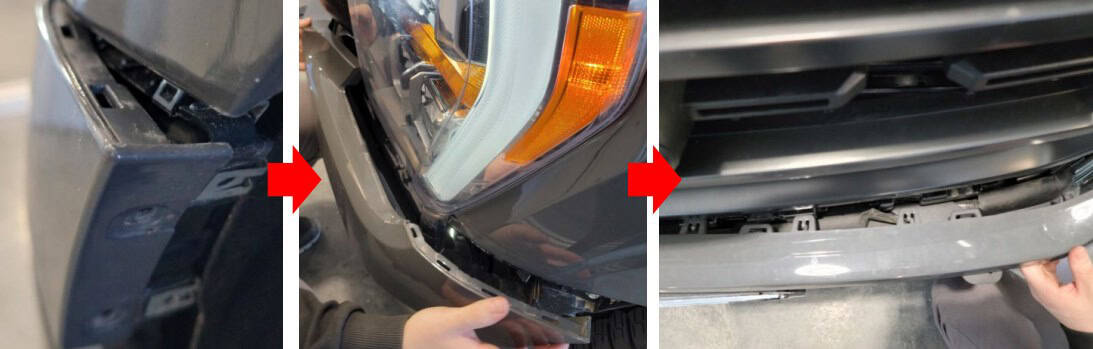
Unclip the mid-bumper trim
Start at a wheel well and work toward the centre, gently pulling the trim away until its clips release. Repeat from the other side.
Step 3 of 32
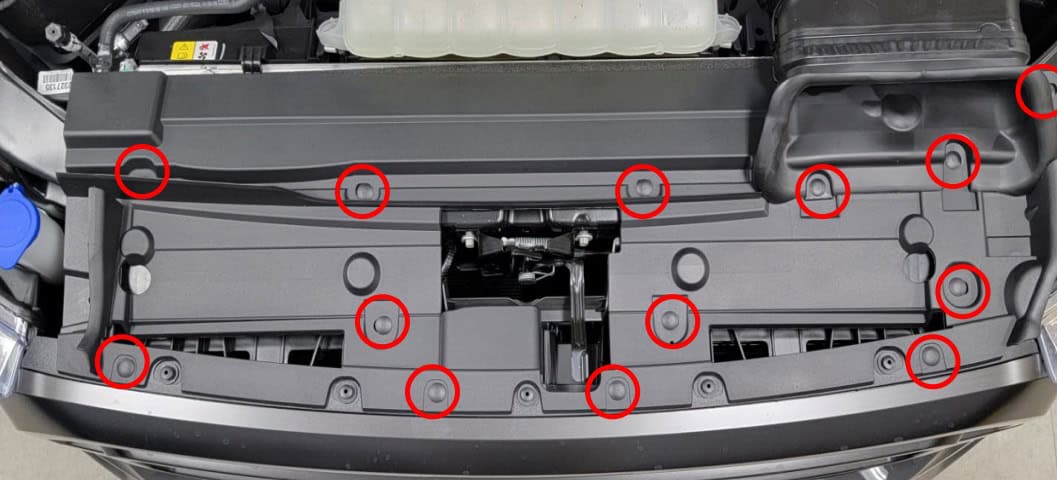
Lift off the radiator support cover
Open the hood. Remove the 13 plastic retaining clips with a trim tool, then lift away the black radiator core support panel.
Step 4 of 32
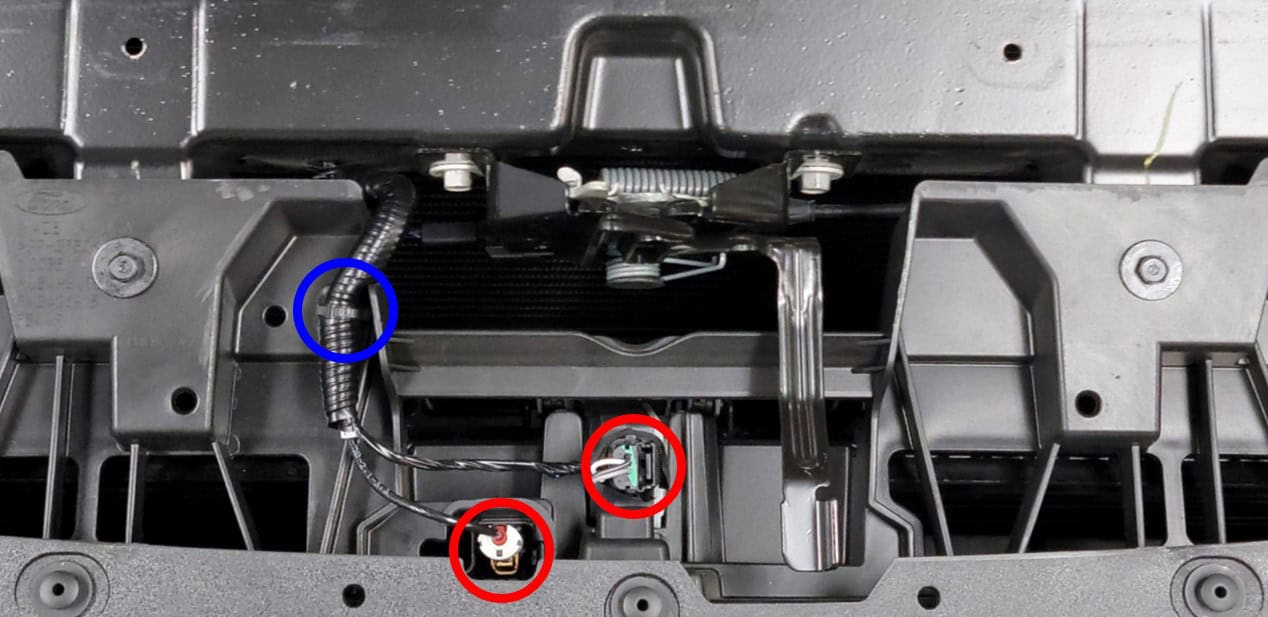
Unplug the grille wiring
Disconnect the connectors beside the hood latch, marked in red. Release the wiring retainer marked in blue.
Step 5 of 32
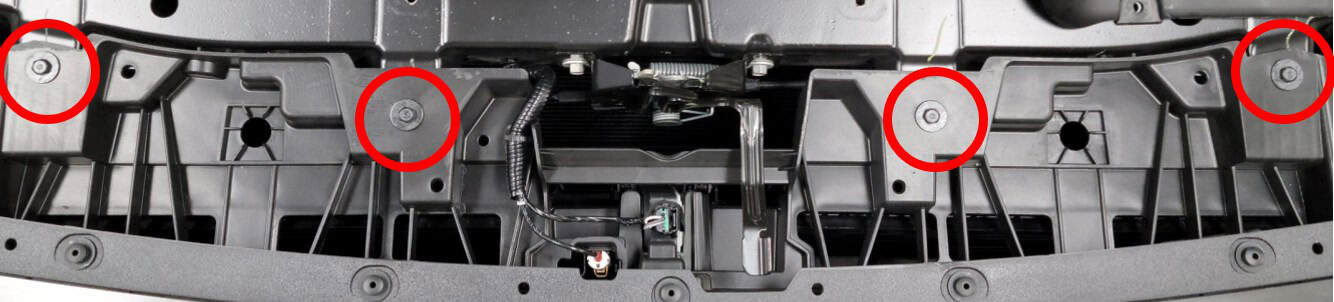
Remove the upper grille bolts
Remove the four 10mm bolts across the top of the grille.
Step 6 of 32
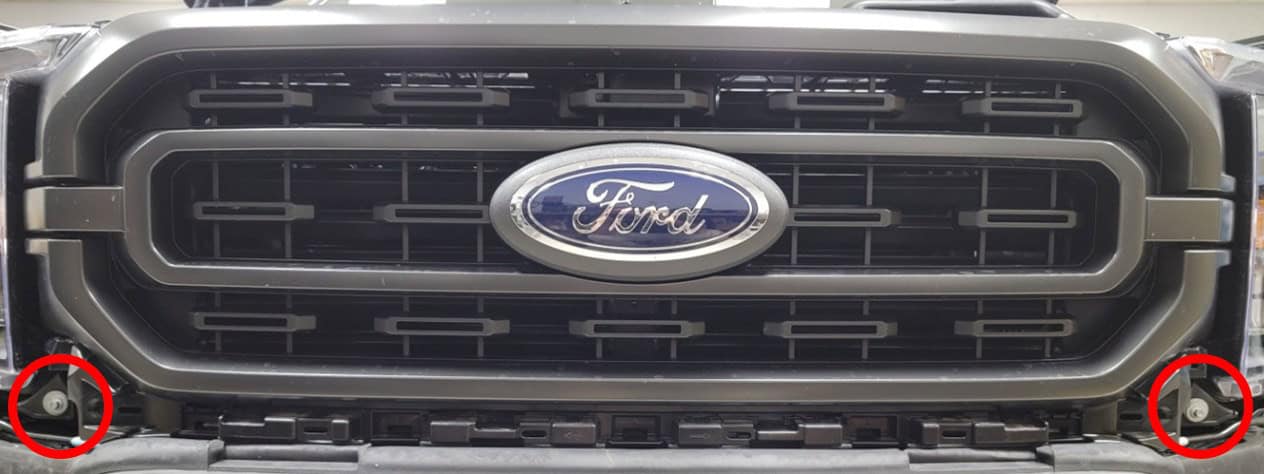
Remove the lower grille bolts
Remove the two 8mm bolts at the lower grille corners beside the headlights.
Step 7 of 32
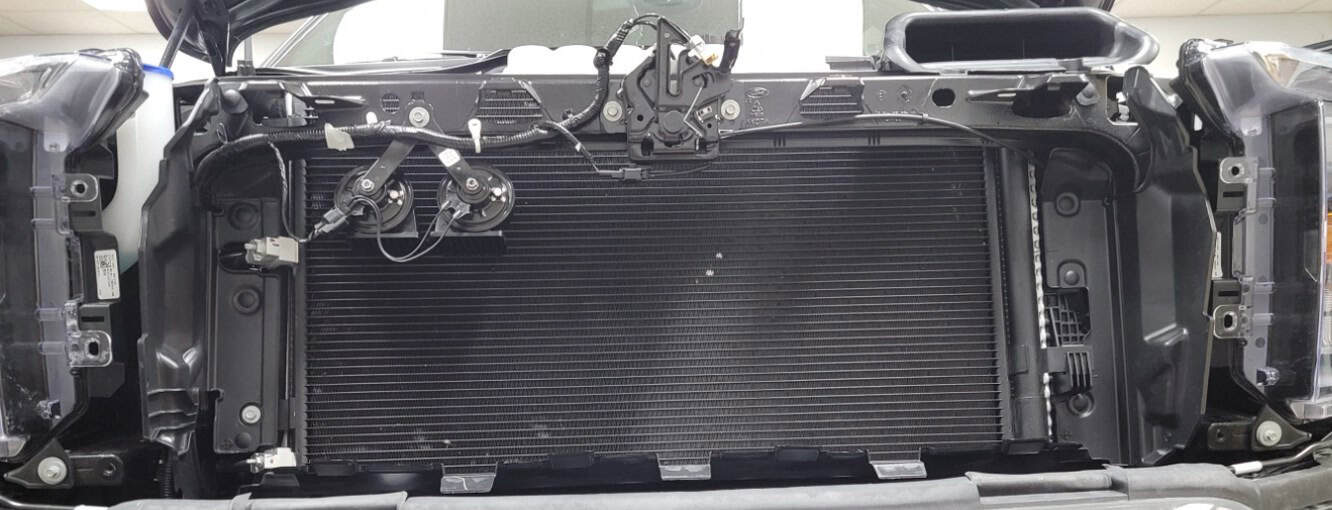
Set the grille aside
Pull the grille carefully away from the truck to release the remaining retainers, then place it somewhere protected.
Step 8 of 32
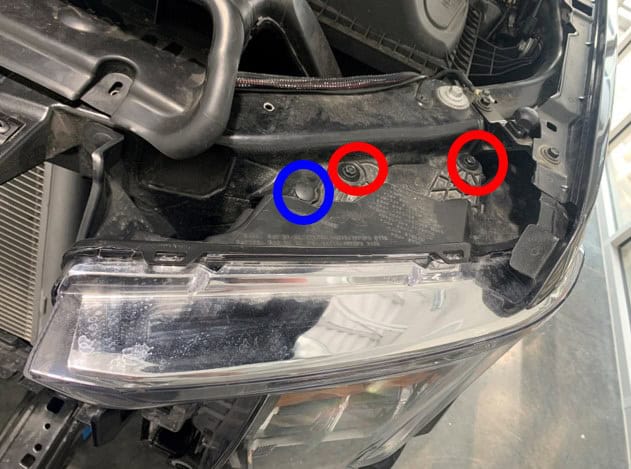
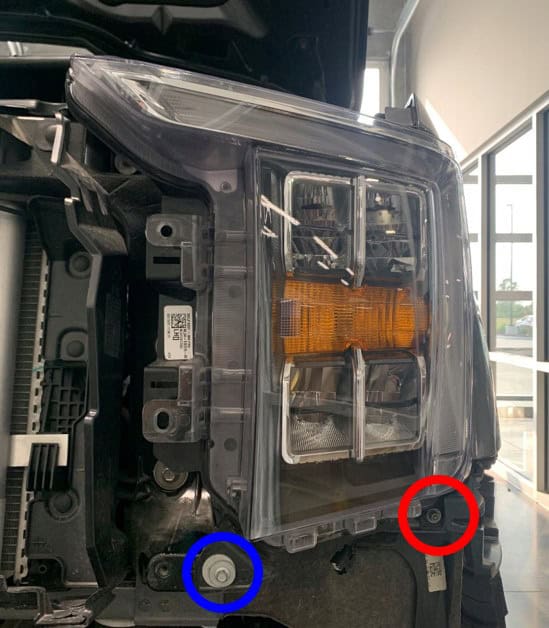
Undo the headlight fasteners
Start on the driver’s side. At the top of the headlight, remove the plastic clip marked blue and the two 10mm bolts marked red. At the bottom, remove the outer 8mm bolt marked red and the inner 10mm nut marked blue.
Step 9 of 32
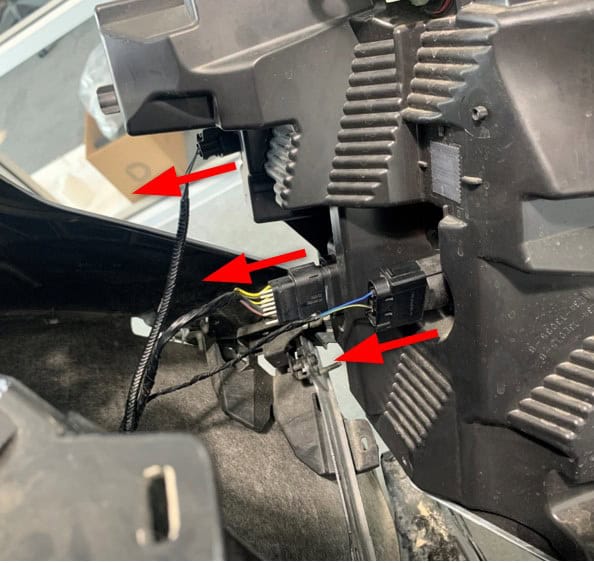
Disconnect the first headlight
Pull the lamp straight toward you to release its ball-pin retainer. Lean it forward, unplug the three rear connectors and remove the lamp.
Step 10 of 32
Remove the other headlight
Repeat steps 8–9 on the passenger side.
Step 11 of 32
Disconnect the bumper wiring
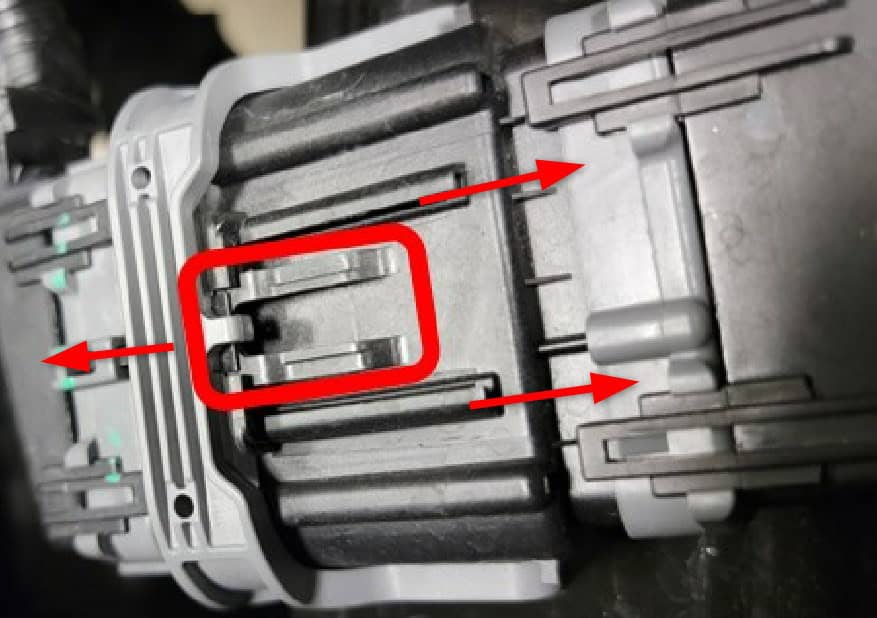
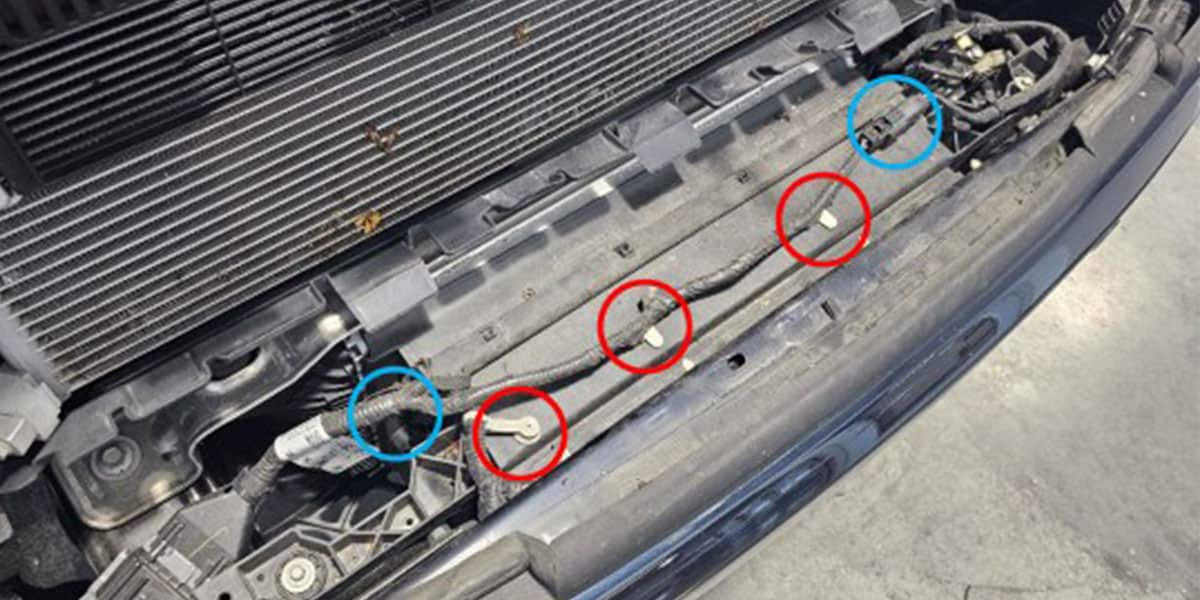
On the passenger-side frame rail, press the dark-grey release tab and separate the large bumper connector. If your truck has a lower radiator shutter, remove its three clips marked red and disconnect both connectors marked blue. The shutter stays attached to the bumper.
Step 12 of 32
Remove the bumper nuts
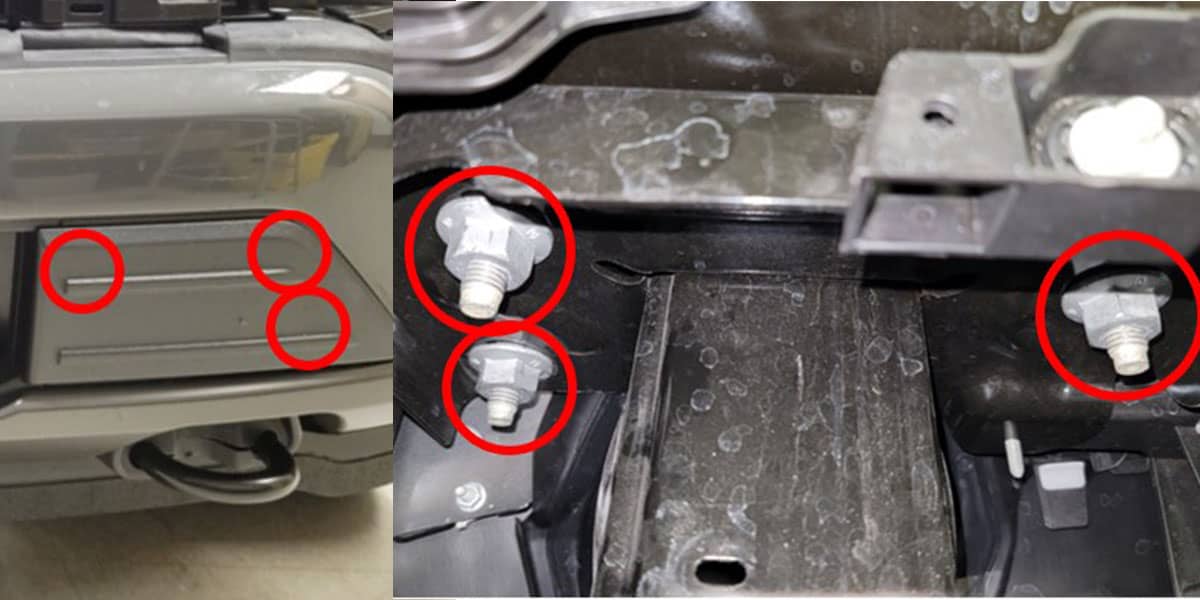
With the bumper supported, reach through the grille opening. Remove the three 21mm nuts at each frame rail, six in total. The marked locations are shown below.
Step 13 of 32
Move the bumper away
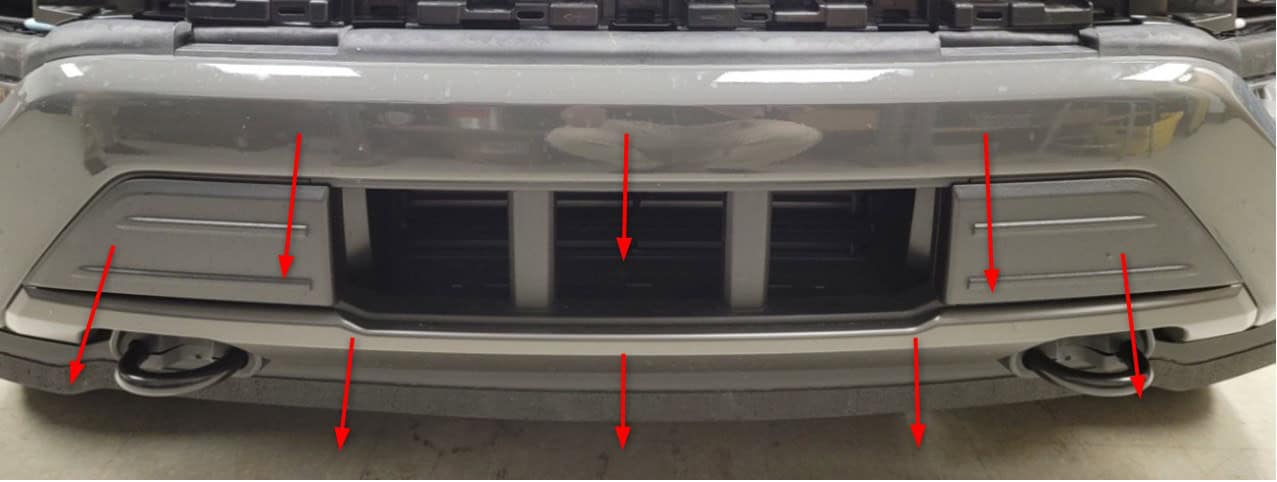
Slide the bumper forward off the tow hooks and place it on a protected surface.
Step 14 of 32
Remove the active air dam as an assembly
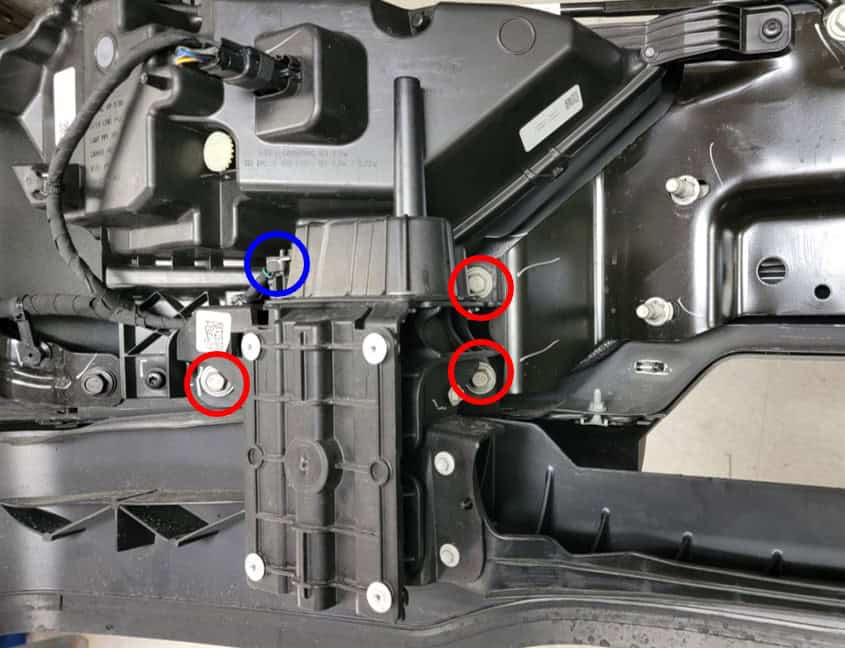
Disconnect the wiring on both air-dam actuators, marked blue. Remove the three 13mm bolts at each actuator, marked red. Lift away the complete assembly with both actuators and the connecting blade.
Step 15 of 32
Remove the old fog lamps
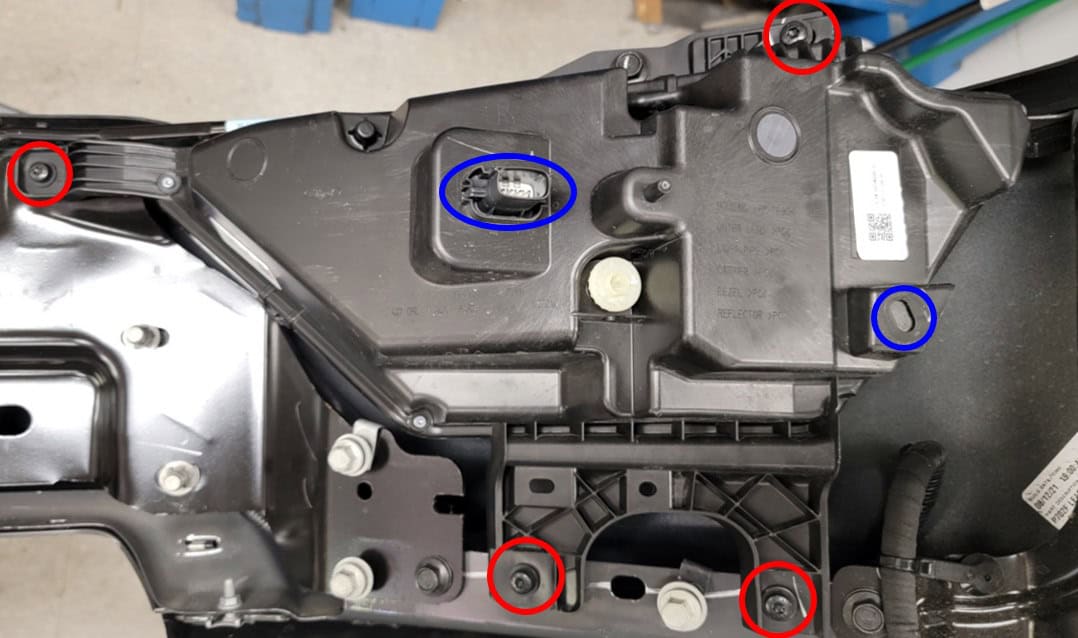
At each lamp, unplug the factory fog connector and release the wiring retainer marked blue. Remove the four T30 screws marked red and take out the lamp. Keep the screws for the new lights.
Step 16 of 32
Mount the Elite fog lamps and choose your connection
Secure each Elite fog lamp with its four original T30 screws.
- Factory LED fog lights: the factory fog connector plugs directly into the new lamp.
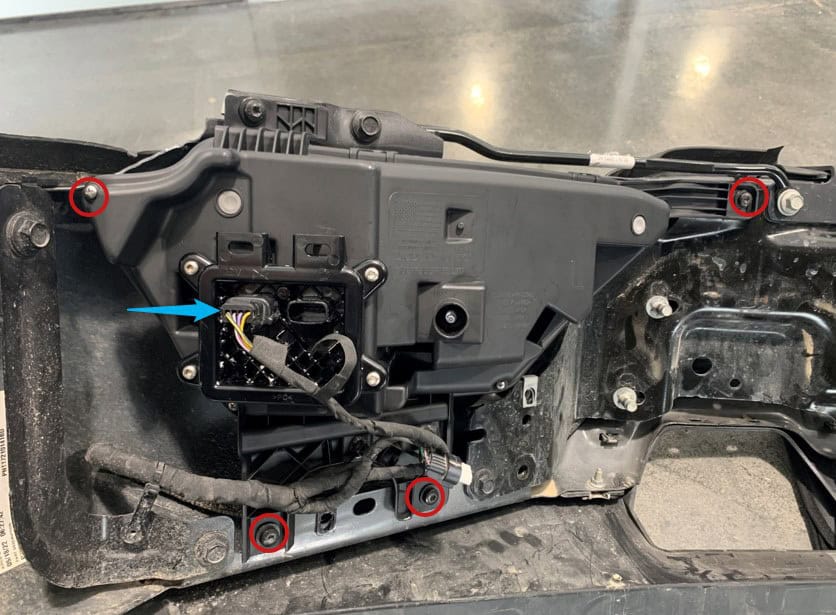
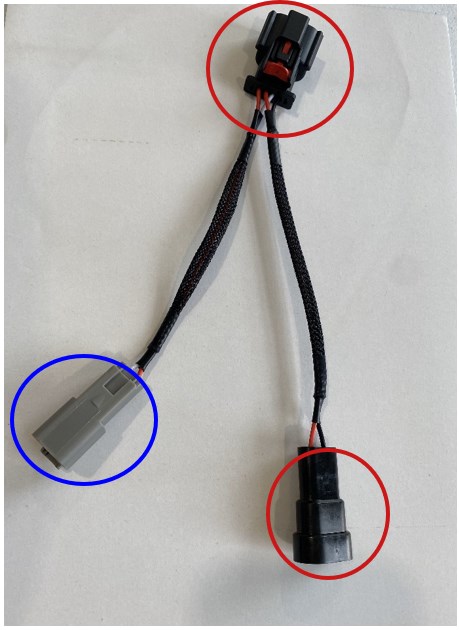
- Factory halogen fog lights: insert the supplied adapter between the factory connector and the Elite lamp. Leave its Deutsch-style connector ready for the constant-power harness in step 21.
- Keeping factory LED headlights and factory LED fog lights: the factory fog connectors are sufficient; the included harnesses are not required. Complete the mechanical steps, but skip steps 21 and 22.
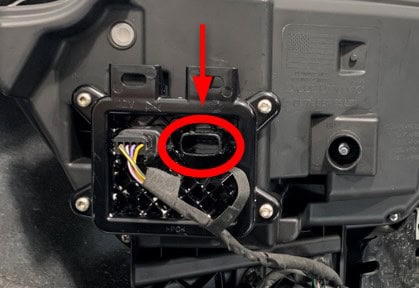
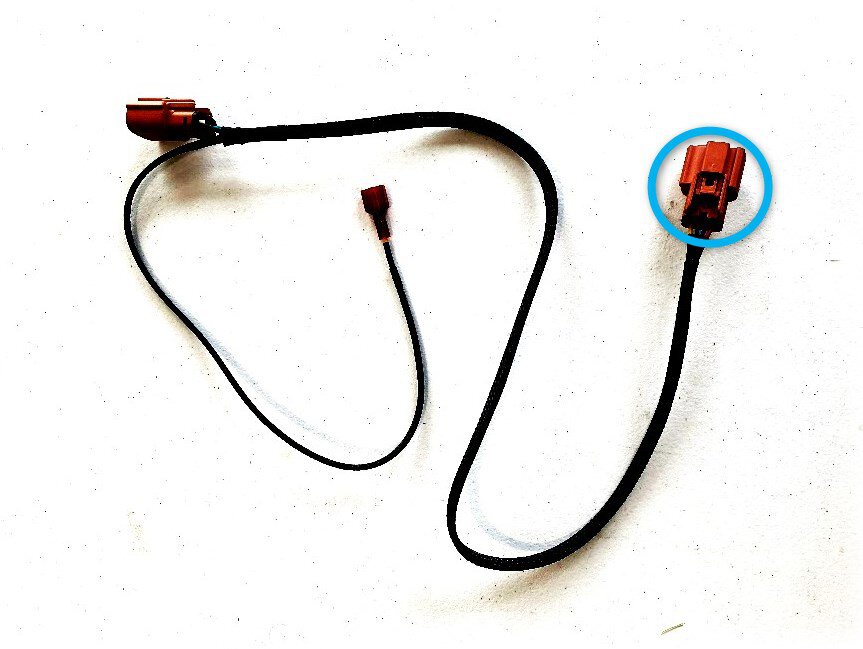
- Connecting Elite headlights: remove the cap from each fog lamp’s communication port, attach the supplied communication wire and route the other end into the headlight opening. It connects to the headlight in step 24.
Step 17 of 32
Refit the active air dam
Reinstall the complete active air dam with the six 13mm bolts removed earlier and reconnect both actuator connectors. Use the marked assembly photo in step 14 to locate them.
Step 18 of 32
Refit the bumper
Slide the bumper over the tow hooks and back against the truck’s frame rails.
Step 19 of 32
Torque the bumper fasteners
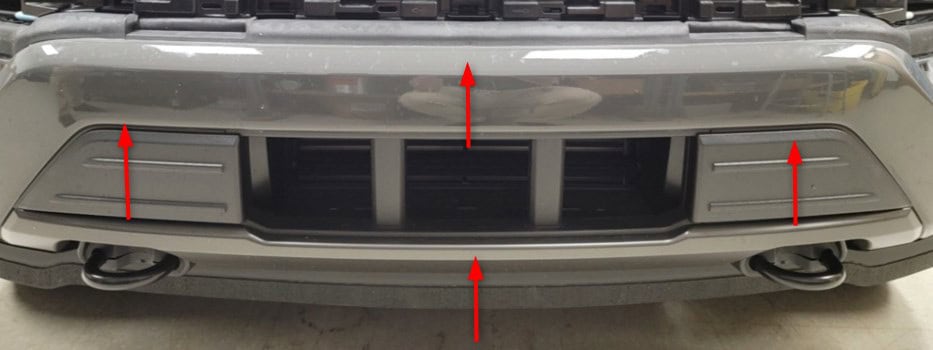
Install the six original 21mm nuts and tighten them to 78 lb-ft, as specified in the Diode Dynamics installation instructions.
Step 20 of 32
Reconnect the bumper and shutter
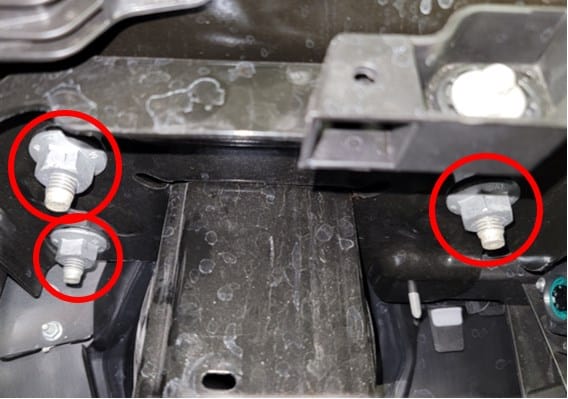
Reconnect the large bumper connector. If you disconnected a lower radiator shutter in step 11, restore its three clips and both connectors too.
Step 21 of 32
Connect power for factory-halogen fog applications
If retaining factory LED headlights and LED fog lights, skip to step 23. Other factory-LED fog installations skip this power-harness step and continue to step 22.
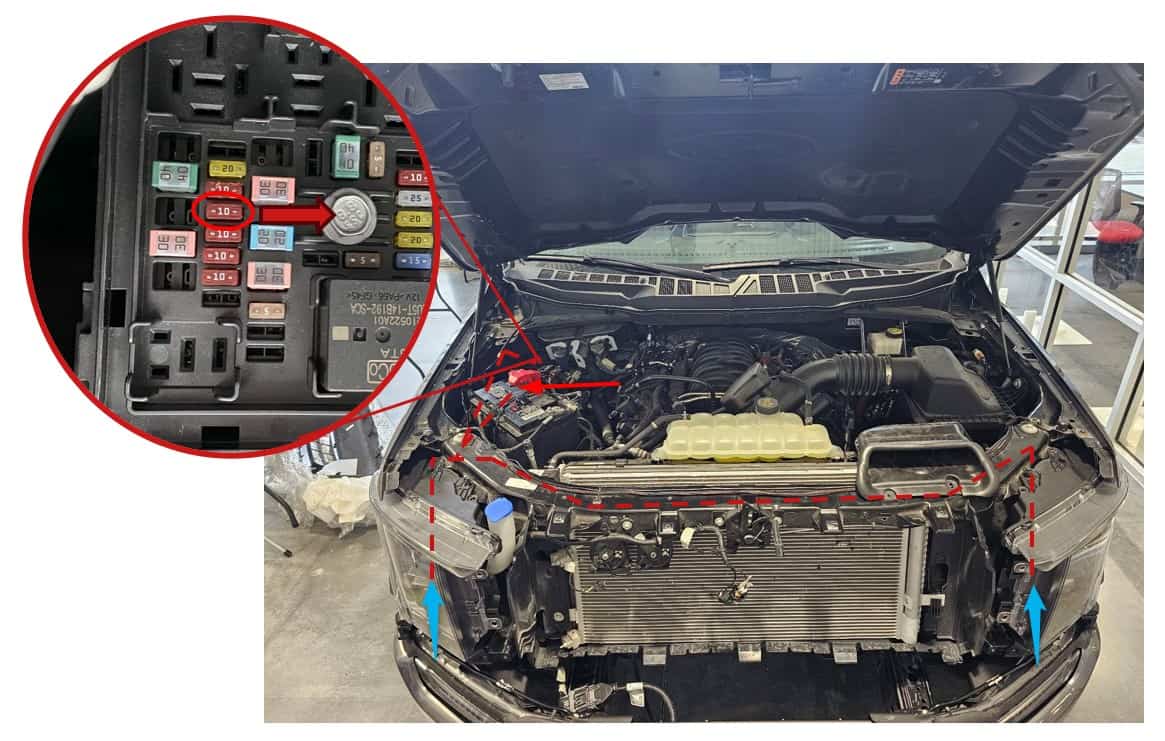
For factory-halogen fog lights, route the included constant-power harness along the illustrated path. Connect its ring terminal to battery positive and connect its Deutsch-style outputs to the inline adapters installed in step 16. Fit the Add-A-Fuse at F25 for ignition power. Its wire lead must point toward the positive post in the fuse box, following the red arrow in the enlarged diagram.
Step 22 of 32
Connect the turn-signal path
If retaining factory LED headlights and factory LED fog lights, continue to step 23. If connecting Elite headlights, use the communication wires in step 24 and do not use the T-Taps.
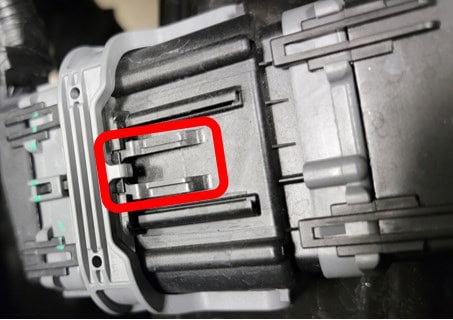
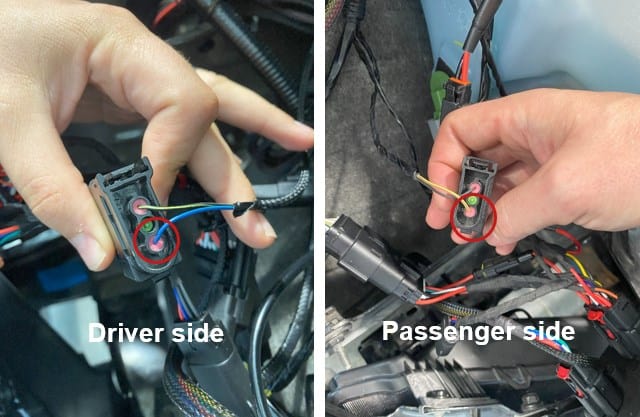
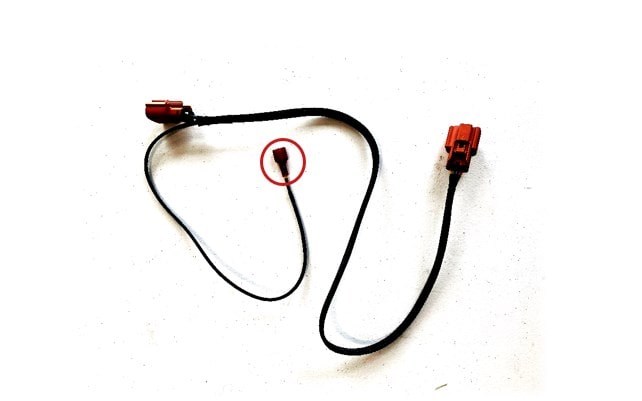
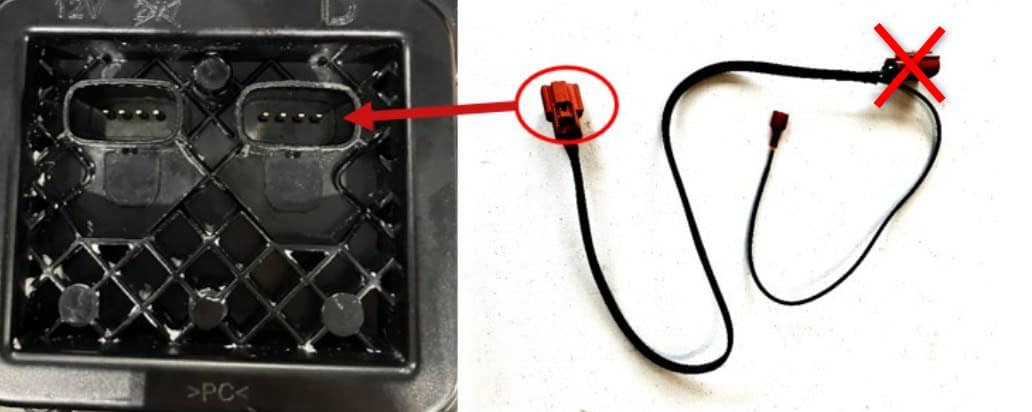
For the remaining factory-headlight applications, find the 3-pin turn-signal connector behind each headlight. Identify the wire in pin 3; the photo highlights the connection on each side. Fit the included T-Tap to that wire. Route the communication harness to the corresponding fog lamp and connect it to the illustrated port. The connector marked X is unused; secure it to the harness. Repeat on the other side.
Step 23 of 32
Check the fog-light functions
Test the fog lights before refitting the headlights. If the DRL does not work and its brightness was previously changed with FORScan, Diode Dynamics advises returning the vehicle’s DRL brightness to the factory setting; its guide notes that this is typically 25% or lower. Do not change an untouched setting unnecessarily.
Step 24 of 32
Reconnect the headlights
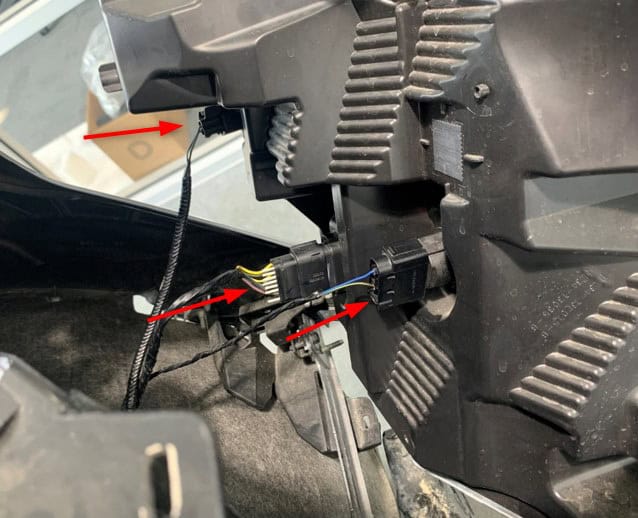
If keeping factory headlights, reconnect their three wiring plugs. For an Elite-headlight installation, follow the BTS Elite headlight installation guide for the headlight wiring.
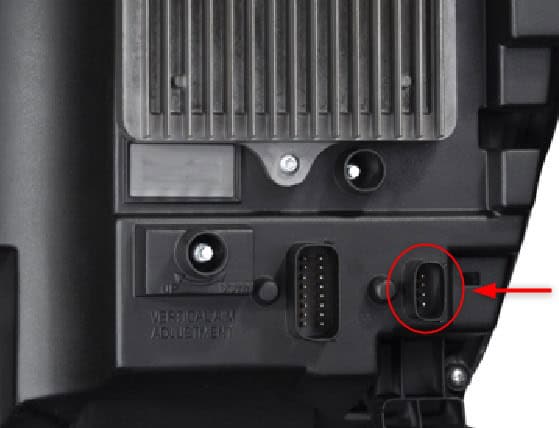
If you routed fog communication wires in step 16, remove the cap from each Elite headlight’s communication port and plug in the corresponding wire. The T-Taps are not used with this direct link; secure them to the communication harness.
Step 25 of 32
Secure both headlights
Refit the lower outer 8mm bolt and lower inner 10mm nut, then the two upper 10mm bolts and plastic clip. Repeat on the other side. The upper and lower fastener photos in step 8 show the positions.
Step 26 of 32
Position the grille and fasten the lower corners
Return the grille to its mounting position and reinstall the two lower 8mm bolts. See the lower-bolt photo.
Step 27 of 32
Secure the upper grille
Refit the four upper 10mm bolts shown in the step 5 photo.
Step 28 of 32
Restore the grille connections
Reconnect the grille harnesses near the hood latch and refit their retainer, using the step 4 photo as a reference.
Step 29 of 32
Refit the radiator support cover
Install the black cover and all 13 original clips, shown in the step 3 photo.
Step 30 of 32
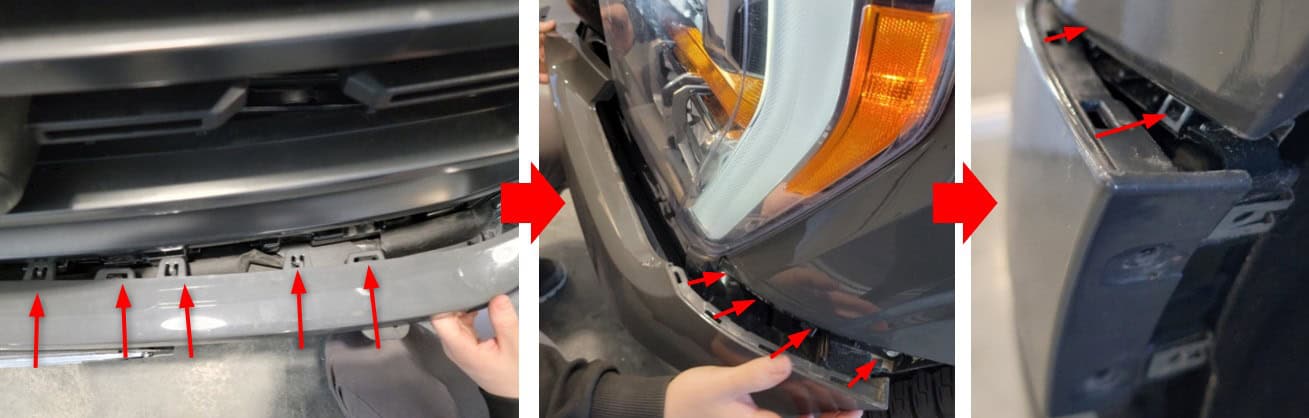
Snap the mid-bumper trim into place
Align the trim, then work from the centre outward until every retaining clip is seated.
Step 31 of 32
Secure the fender liners
Refit the two 7mm fender-liner bolts on each side.
Step 32 of 32
Aim the fog lights
Park on level ground 25 feet from a wall. Measure from the ground to the centre of each fog lens and place a horizontal tape line on the wall at that height. The two measurements should match.
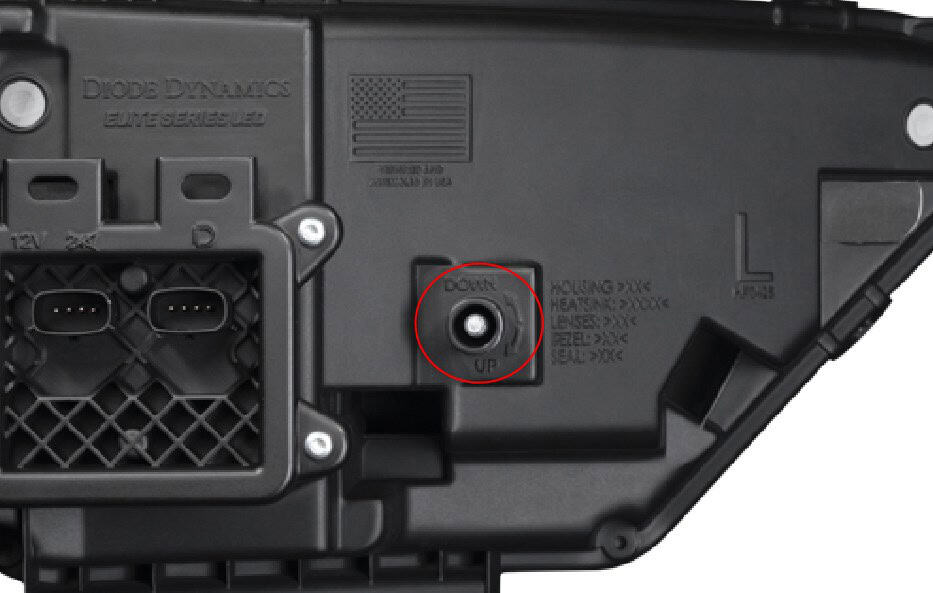
Turn the fog lights on. Set the top of each beam gradient four inches below the tape line. Reach the adjuster from beneath the truck and use the supplied aiming tool or a 4mm socket: clockwise raises the beam, and counterclockwise lowers it.
Diode Dynamics’ fog-light aiming demonstration. The F-150 adjustment details are below.
Set your preferences
Once installation and aiming are complete, check the lights again and use the BTS fog-light programming guide to select your DRL colour, turn-signal style and welcome setting.